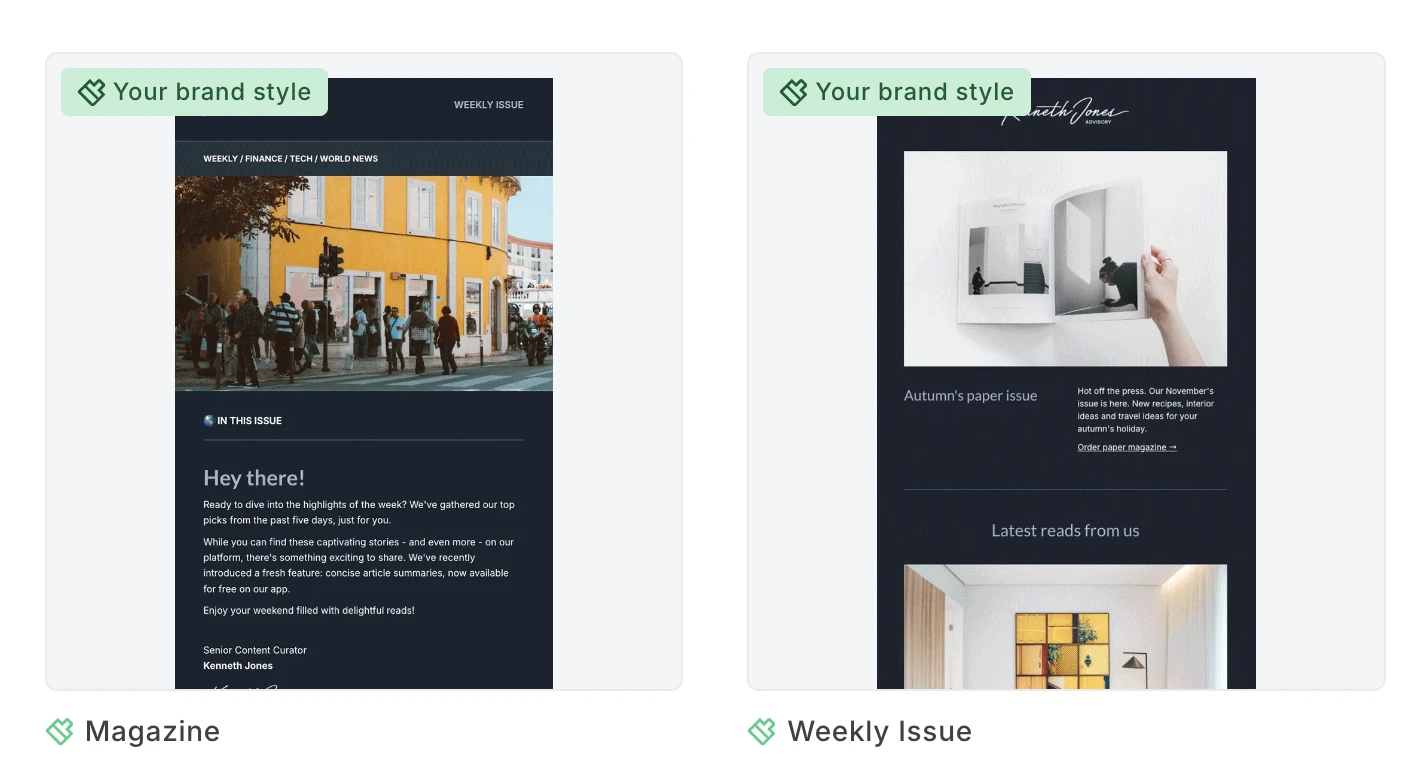
We've added 2 new ready-to-use branded templates to help you launch on-brand campaigns faster. Set up your brand styles once, and your logo, fonts, colors, and social links drop into place automatically into these templates. Tada! ✨
What’s new in MailerLite?
Get the latest product news sent monthly to your inbox.
Shopify sync now works both ways
MailerLite's Shopify integration now supports two-way sync. Updates to a subscriber's name, email, or marketing status in MailerLite will now push back to Shopify automatically, and new subscribers added in MailerLite will be created in Shopify too. Existing users will need to re-authorize the integration to enable this; until then, everything keeps working one-way as before, with no disruption.
Smarter field mapping on CSV import
CSV imports now preselect the right field for each column, like last name, email, phone number, and ZIP, instead of leaving the mapping page empty. You can still review and adjust everything before importing; nothing gets auto-submitted.
Control your re-engagement audience size
Re-engagement automations now let you send to just a slice of your segment instead of the whole thing, starting at around 10% of your active list by default. You can adjust it anytime, even after the automation is already live. Subscribers outside the slice stay in the segment; they just won't be entered into this run, so there's still a path back in for them later.
Share draft campaigns safely, with a passcode
You can now share draft campaigns externally for review with a link and a short, 6-digit passcode. 🎉 Reviewers enter the passcode once to get a read-only preview, no account needed. The link always points to the latest saved version of the draft, so edits show up automatically without reshared links.
Simple Editor: Code blocks, video, and more color control
A batch of upgrades has landed in the Simple Editor. 🎉 You can now drop in a Code block, a standalone spot to write your own HTML that gets inserted directly into the email. Font size is now also in your control: Set global default sizes for H1, H2, and H3 headings from the styles panel, or adjust the size of any individual heading or text block right from the toolbar, switching to a "Custom" state whenever you override the default. Text and highlight colors also got an upgrade: instead of choosing from 8 preset swatches, you now get a full color picker. Rounding things out, you can now insert a Video block straight from the slash command menu (YouTube and Vimeo links only, for now), with controls for width, alignment, play button color, a custom or animated preview image, and alt text. YouTube Shorts are supported, too.
MailerLite is now in the ChatGPT directory
MailerLite is now listed in ChatGPT's app directory, so ChatGPT users can find and connect their MailerLite account directly inside a chat, no separate setup required.
Copy and paste for any automation step
You can now copy and paste any step in an automation, not just emails. Delays, conditions, actions, A/B tests, all of it. Copy lives in the "…" menu on every step type, with the option to paste it anywhere valid, or work entirely from the keyboard with ⌘C and ⌘V (Ctrl+C / Ctrl+V on Windows). Even incomplete steps, like an email you haven't designed yet, can be copied, and each paste opens the sidebar on the new copy so you can configure it right away. Note: Copying a condition step brings over the condition only, not its contents. Paste it mid-workflow and you'll be asked which branch the following steps should move under. A/B test steps copy as an empty shell, with no inner paths or selected winner.
2 new templates, styled to match your brand 🎨
Give your AI agent marketing expertise
You can now give AI agents like Claude and Cursor proper email marketing know-how for your MailerLite account, not just API access. With the new email marketing skill installed, your agent knows how to build campaigns and automations the way an experienced marketer would: creating campaigns as drafts, confirming audience size before any send, using only verified senders, and refusing to touch purchased lists or re-add unsubscribed contacts. It's easy to add to Claude Code, Cursor, and around 70 other AI tools with a single install.
Purchase specific product trigger gets variant support
Now you can target the exact variant a customer bought — a red hoodie in size L, a specific SKU, whatever matters most to your store. Variant data like size, color, and material syncs straight from your store into MailerLite, with a new multi-select field in the trigger settings for any product with variants. It's live on Wix now. BigCommerce, Shopify, PrestaShop, WooCommerce, Shoper, and our e-commerce API are coming soon. We'll keep this page updated as each one rolls out.