Unsubscribe survey: Learn why your readers leave and how to fix it

 Nikola, CTO
Every email marketer knows the feeling. You check your campaign report, and there it is: the unsubscribe count. It stings a little every time. But what if that moment could work in your favor?
An unsubscribe survey is a short set of questions shown to subscribers as they opt out. The answers won't always be comfortable. But they'll almost always be useful. Unlike open rates or click-throughs, an unsubscribe reason is a person actively telling you something. That honest feedback is valuable and something you can act on.
This guide walks you through everything you need to turn your unsubscribe survey from a quiet goodbye into a strategic asset for your overall email marketing strategy. From reading the survey data correctly to designing a page that might just convince people to stay.
What are unsubscribe pages and surveys
An unsubscribe page is where subscribers land after clicking the unsubscribe link in your email. It typically confirms they've been removed, but it can do a lot more than that.
One of the most valuable things you can do on this page is to use an unsubscribe survey to ask a simple question: why are you leaving? This gives people who leave your list a quick way to share why they unsubscribed, and gives you data you can actually act on. Over time, those survey results reveal patterns that no other metric can.
Unsubscribe page best practices
A well-designed unsubscribe page does 3 things:
Makes the unsubscribe process frictionless: Nobody should have to hunt for a confirm button or wade through guilt-tripping copy. Respecting the reader's decision to leave builds trust.
Captures feedback: This is where your survey does its work. The simpler and clearer the options, the more responses you'll collect.
Offers an alternative: Not everyone who clicks "unsubscribe" actually wants to disappear forever. Some just want fewer emails, so consider letting them choose what kinds of content to receive.
The unsubscribe flow at MailerLite
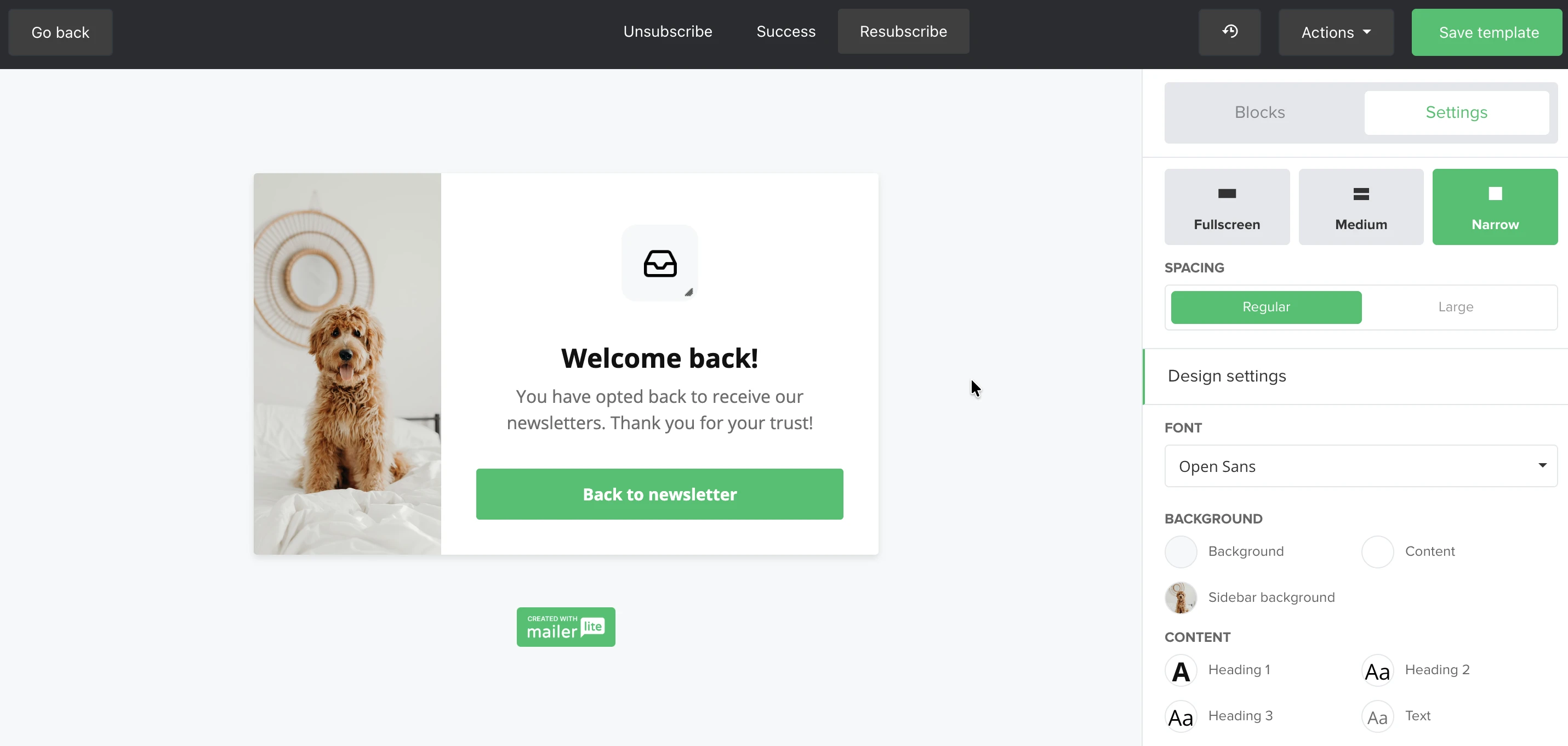
In MailerLite, the unsubscribe flow is made up of up to three pages: the Unsubscribe page (where subscribers confirm their choice), the Success page (where they're confirmed as unsubscribed and shown the survey), and the optional Resubscribe page (a "welcome back" moment if they change their mind).
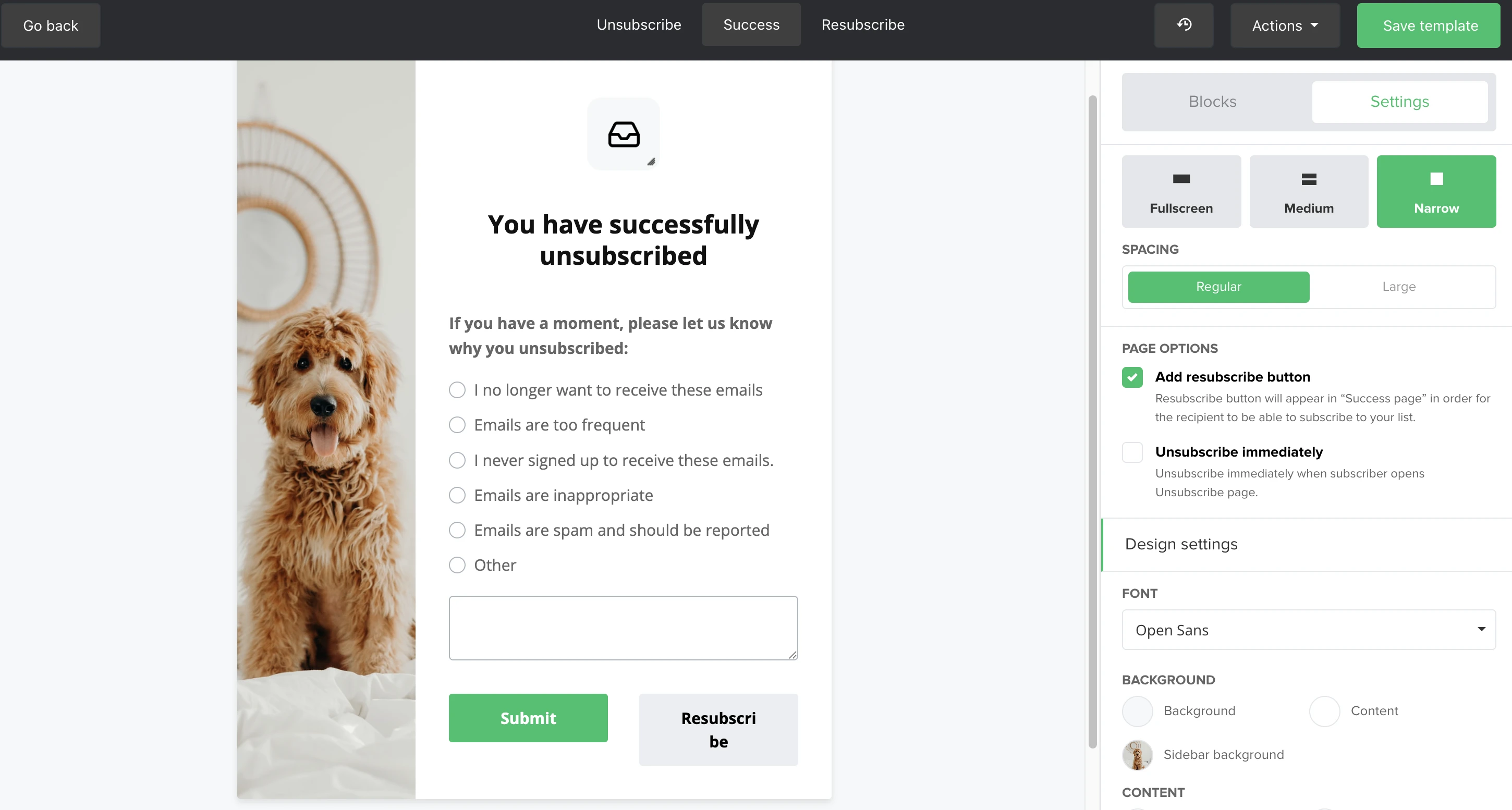
MailerLite's unsubscribe survey gives subscribers 5 standard reasons to choose from, plus an optional "Other" field where they can write in their own explanation, providing valuable additional feedback.
Step-by-step unsubscribe process at MailerLite
Go to your Dashboard, navigate to Account settings, and click Unsubscribe settings.
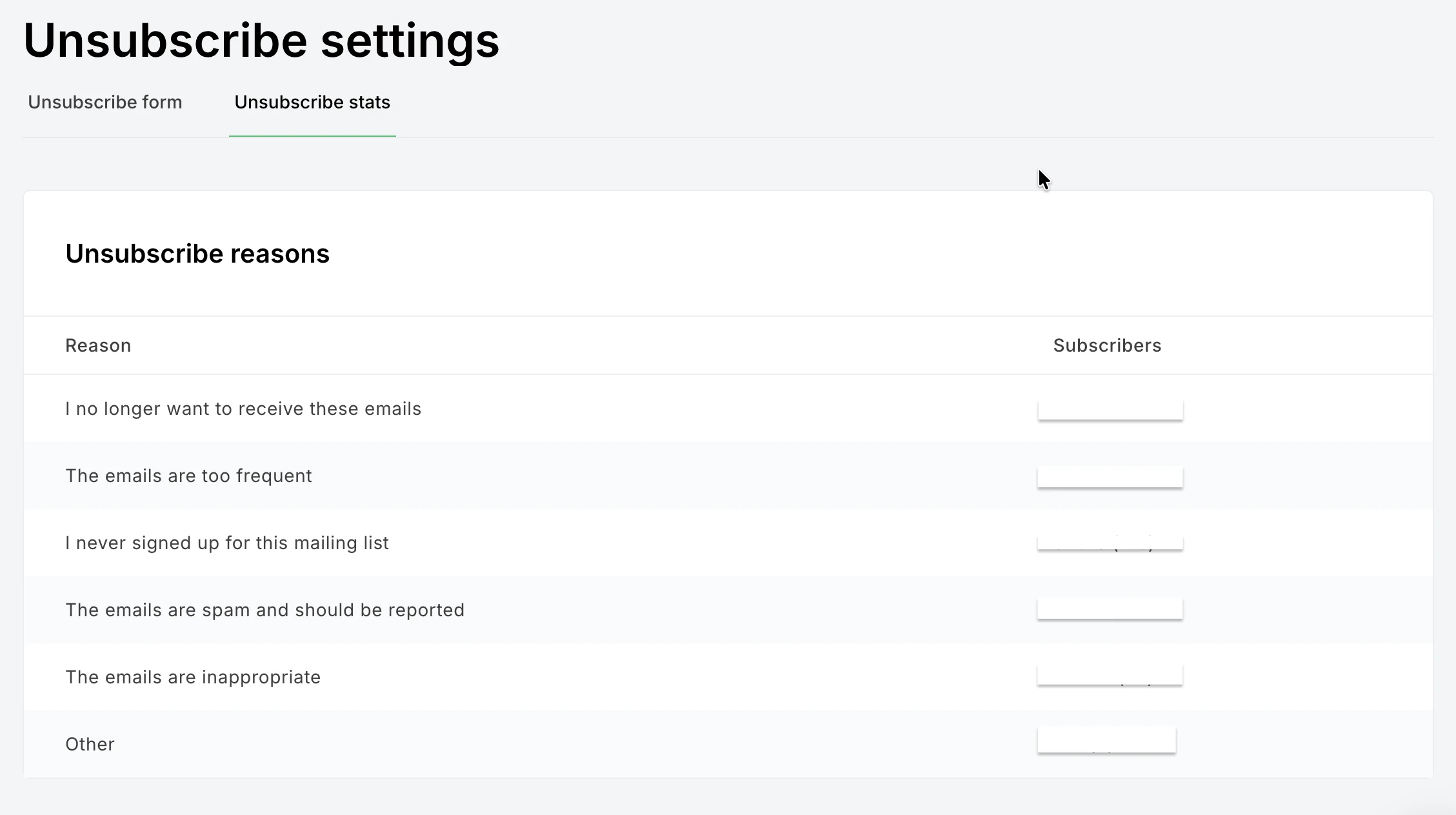
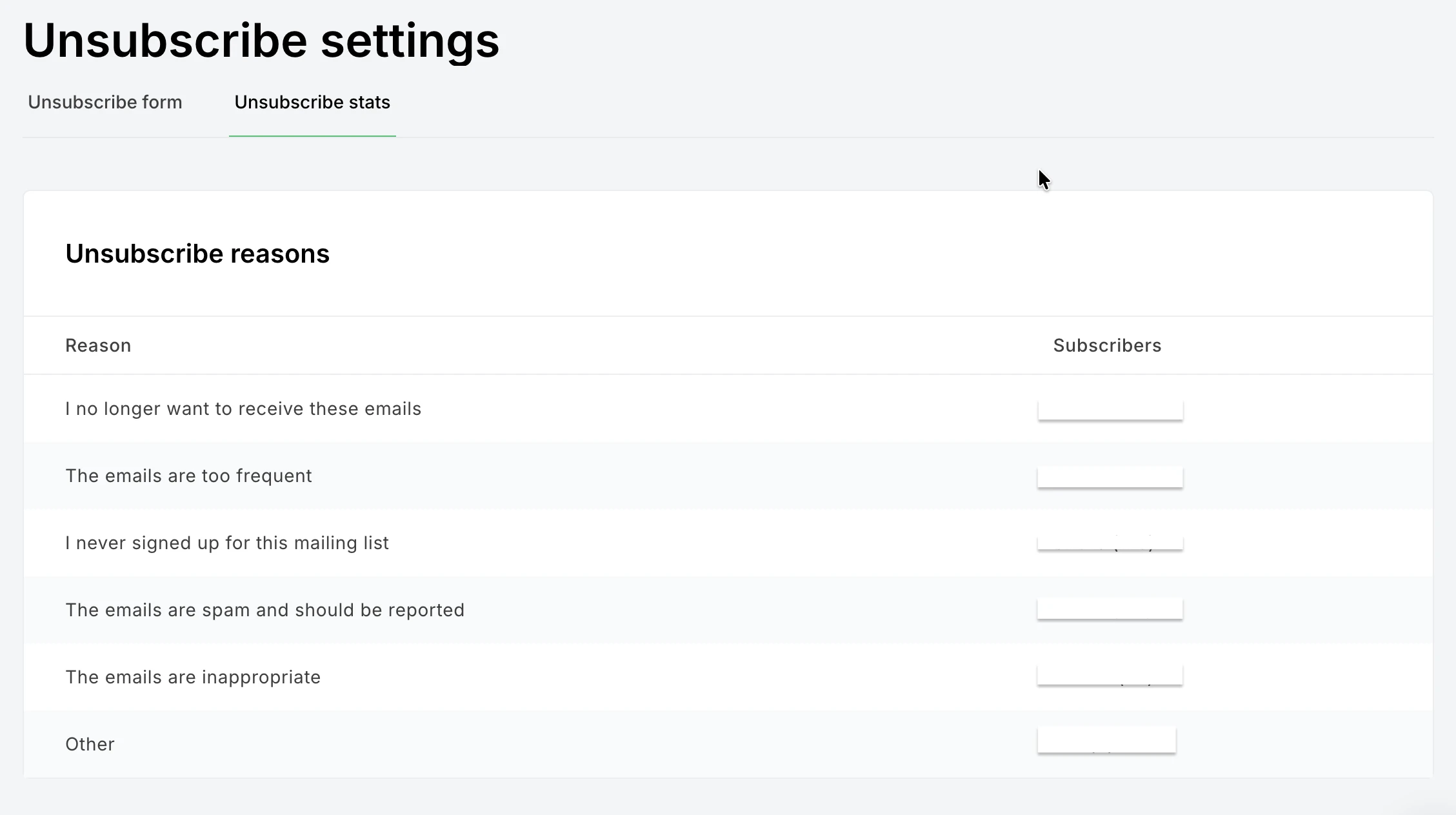
You'll see two tabs: Unsubscribe form and Unsubscribe stats. The form tab is where you customize what subscribers see when they unsubscribe; the stats tab shows you a breakdown of unsubscribe reasons.
In the Unsubscribe form tab, click Edit content to start customizing your page. Here you can choose between two unsubscribe options:
Unsubscribe from all groups: Removes subscribers from all groups to avoid accidentally emailing someone who's already opted out.
Choose groups to unsubscribe from: Lets subscribers selectively opt out of specific groups while staying in others.
Note: Consider setting up your unsubscribe page to show group-level preferences, as this one tweak can meaningfully reduce your overall unsubscribe rate. We’ll discuss this in detail later.
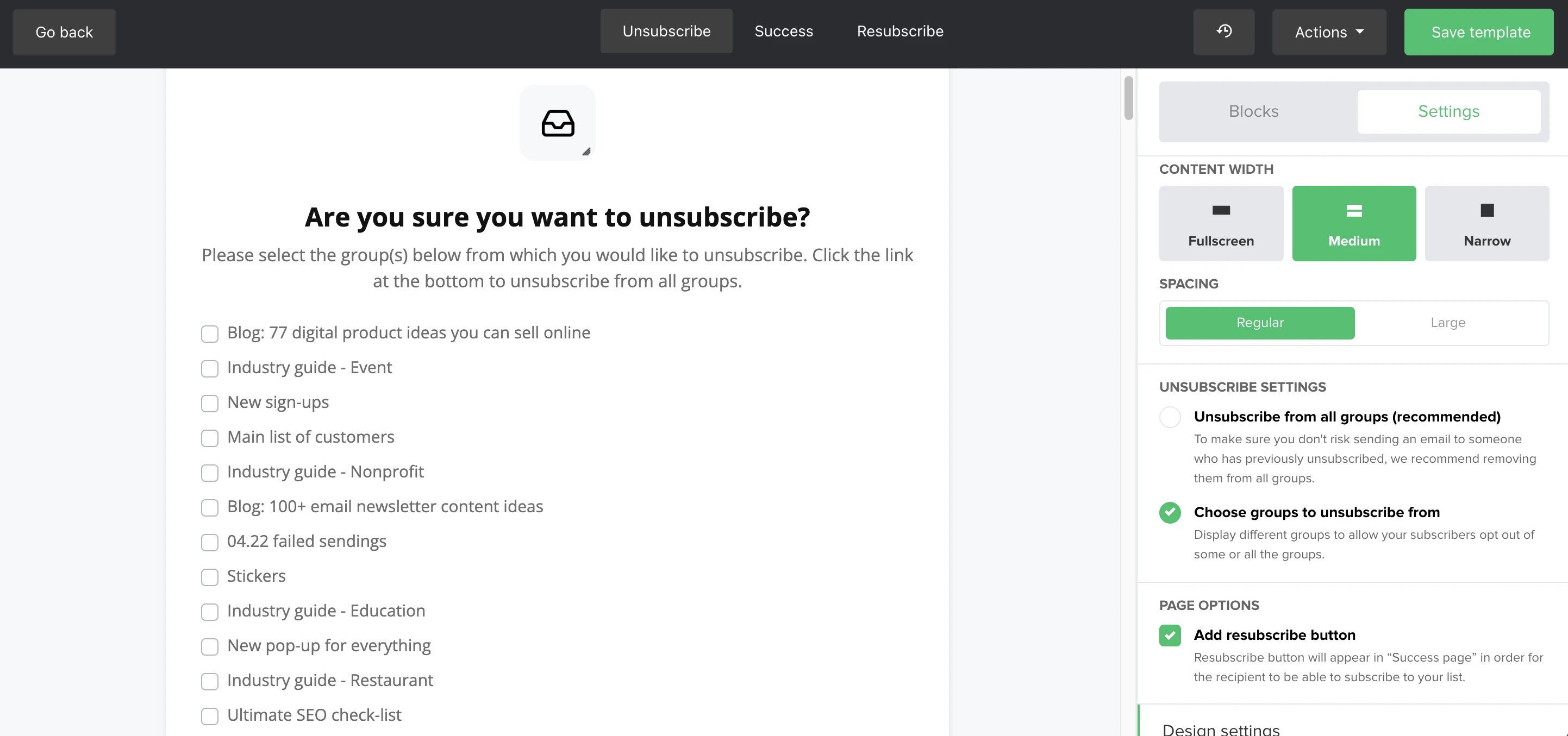
Under Page options, consider enabling the Resubscribe button, which appears on the Success page and gives subscribers an easy way to change their minds. Enabling it automatically creates a third Resubscribe page you can customize.
Use the Design settings to adjust fonts, colors, and button styles to match your brand. You can also add a sidebar under Additional settings.
To add content to the page, open the Blocks tab and drag and drop elements—such as images, text, video, social links, or a newsletter archive—directly into the editor.
Note: Editing the unsubscribe page requires a paid MailerLite plan. For a full walkthrough of customization options, see How to edit the unsubscribe page.
What's a "normal" unsubscribe rate?
According to MailerLite data from over 3.5 million campaigns, the average unsubscribe rate across all campaigns was 0.22%.
Unsubscribe benchmarks vary by industry, list size, and send frequency. But your own trend over time matters more than any single number. So, pay attention to whether your rates are climbing, dropping, or holding steady. That's your real signal.
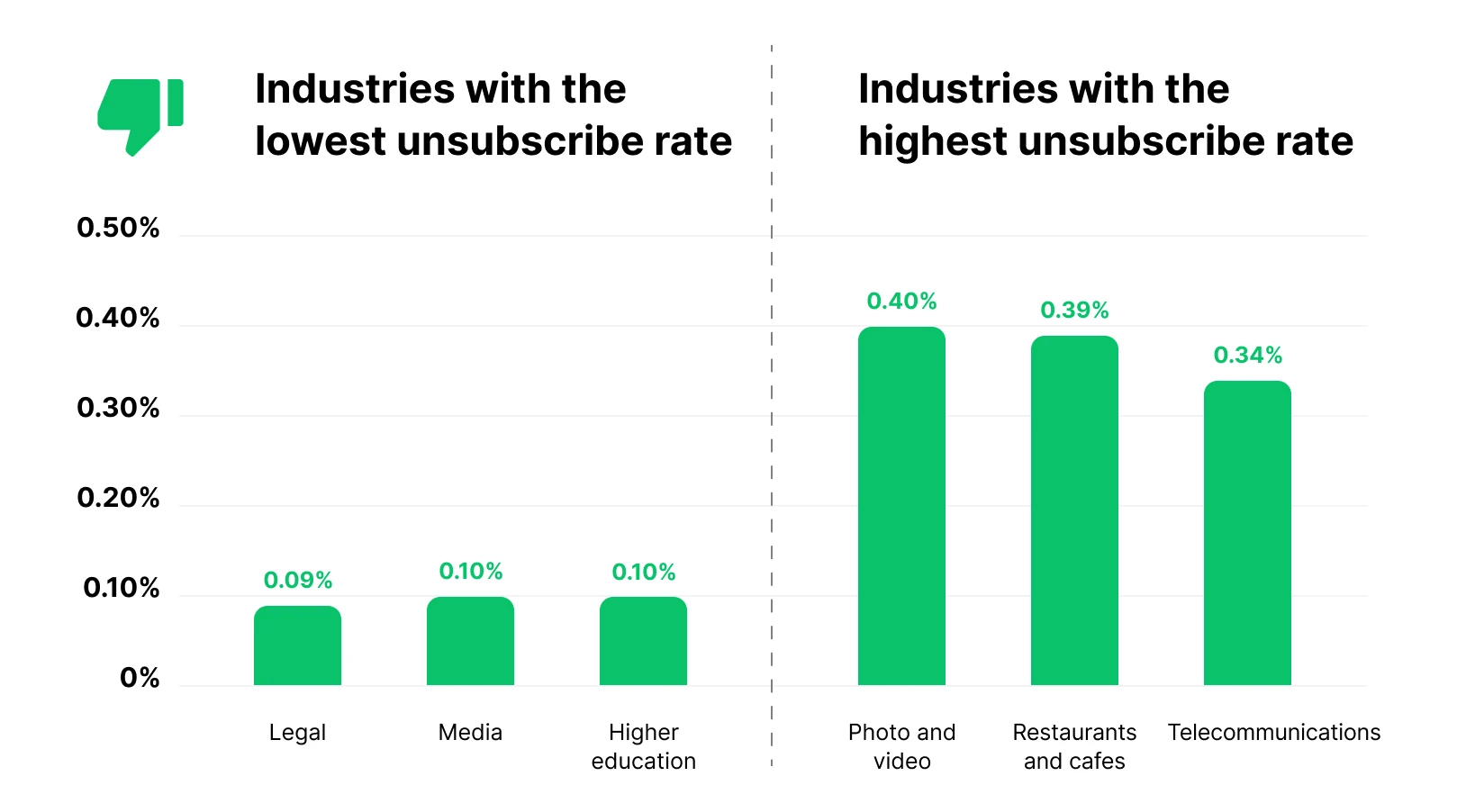
According to our data, photo and video, restaurant and cafes, and telecommunications sit at the higher end (around 0.34% to 0.40%). If you're in one of these categories, giving subscribers the option to receive fewer emails or choose specific topics can make a real difference.
Meanwhile, industries like legal, media, and higher education reported a median unsubscribe rate of around 0.1%, so a consistent email cadence along with relevant content is the key here to keep an engaged email list.
5 reasons why readers leave and how to fix them
Here are the 5 main reasons why your subscribers might unsubscribe from your email list, along with a few fixes to address those:
1. I no longer want to receive these emails: Solve the value gap
This is the vaguest response, which makes it the trickiest to act on. But it usually points to one underlying issue: your content stopped feeling relevant.
Subscribers signed up to receive valuable email communication. If your emails have drifted from that original promise, or if you've been sending the same type of content on repeat, this is your signal to revisit the fundamentals.
What to try:
Audit your last 10 campaigns. Do they reflect what you said you'd send on your signup form?
Introduce segmentation and groups so different subscriber categories get content that actually matches their interests. The goal is to make every email feel like it was written for one specific reader, not blasted to a list
Use dynamic content to personalize emails without rebuilding them from scratch each time
2. The emails are too frequent: Manage cadence and expectations
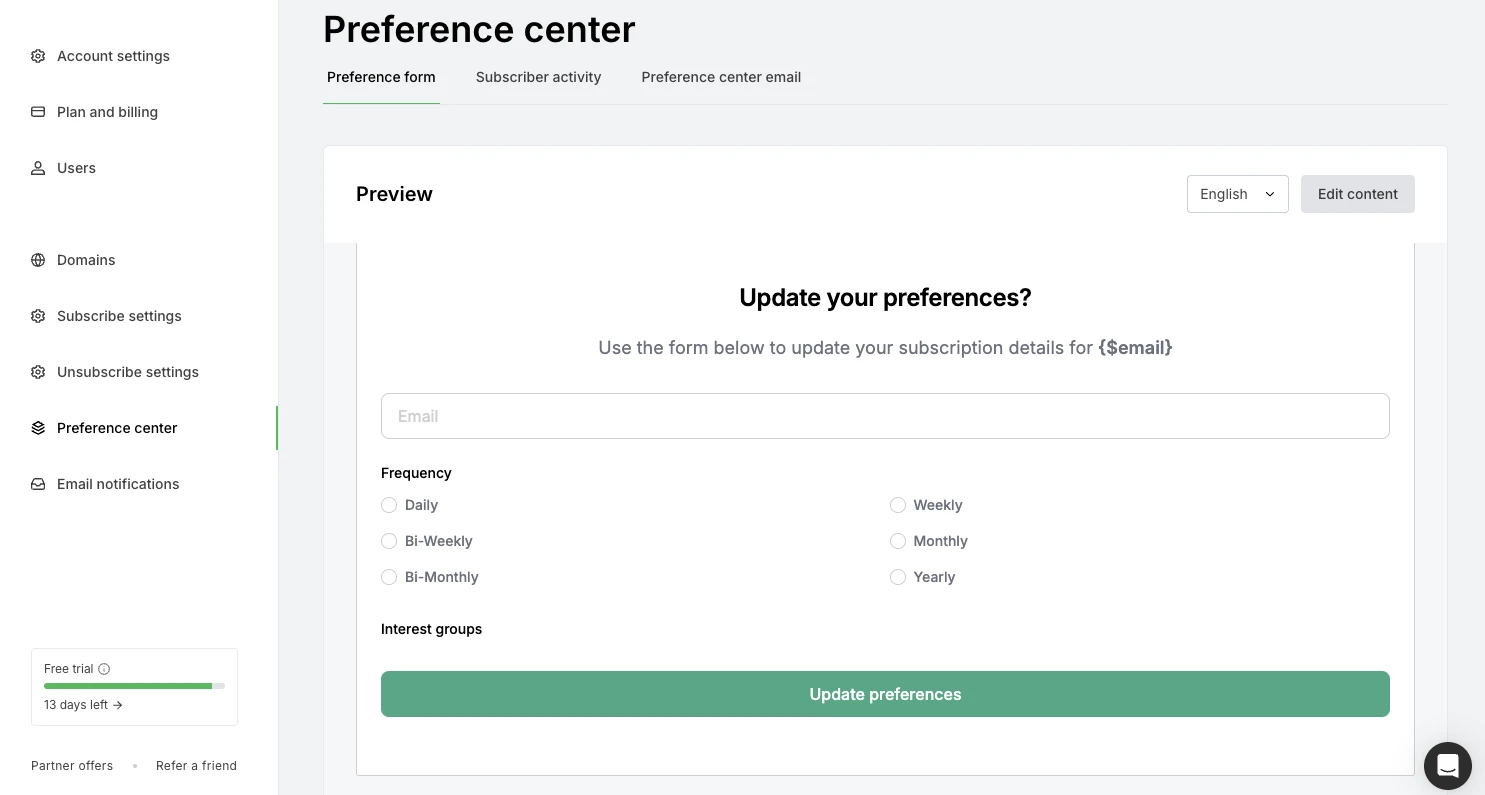
This one is straightforward: you're sending too many emails. If your content calendar requires a high send frequency, consider building a preference center where subscribers can choose how often they hear from you. It's far better for someone to opt down to a weekly digest than to opt out entirely.
Set expectations early, too. Your signup form should mention frequency ("We send every Tuesday" or "Expect 2–3 emails per month"). Subscribers who know what they're signing up for are far less likely to feel overwhelmed later.
3. I never signed up: Audit your list-building tactics
If you're seeing this response with any regularity, it's time for a hard look at how subscribers are entering your list. Common culprits include: pre-ticked signup checkboxes, unclear opt-in language, purchased or third-party lists, or adding contacts from business cards or event sign-ins without explicit email consent.
What to try:
Switch to double opt-in. Yes, it slightly reduces your initial signup numbers, but the subscribers you do get are genuinely interested and far less likely to mark you as spam
Review the copy on every signup form and make sure it’s clear what someone is agreeing to
Audit any integrations or lead sources that feed into your list automatically
A smaller, cleaner list always outperforms a large, unengaged one.
4. The emails are inappropriate: Re-evaluate content relevance
This response is rare, but if you start seeing a trend, take it seriously. "Inappropriate" can mean different things: content that feels off-brand, too salesy, politically charged, or simply not what was promised. The subjective nature of it means you need to look at the pattern, not individual responses.
Questions to ask yourself:
Has the tone of your emails shifted recently?
Are you sending more promotional content than educational or entertaining content?
Have you recently changed topics or angles that might not match your original audience?
If the pattern holds, the answer is usually the same: go back to what your audience signed up for in the first place.
5. The emails are spam: Navigate the danger zone
This is the response nobody wants to see. A handful of clicks here is completely normal; some people just reach for this option reflexively. But you should start paying attention if more than 4 to 5% of people who unsubscribe from your list choose this option. At that point, it can begin to affect your sender reputation and deliverability.
Proactive steps:
Keep your list clean and regularly remove unengaged subscribers
Avoid sending wall-to-wall promotions. Pure sales content, especially without personalization, is what tends to get flagged as spam the most
Building a Preference center
Before someone reaches for the final unsubscribe confirmation, consider giving them options: receive fewer emails, switch to a digest format, or stay subscribed to just one content type.
A Preference center is a page where subscribers can control the emails they receive from you. For example, they can choose how often, which topics, and what type of content they’d like to see. And it actually works! Targeted campaigns based on subscriber preferences generate 36.69% higher open rates and 267.21% higher click-through rates than non-targeted sends.
This works especially well for brands with diverse content: a mix of product updates, editorial content, promotions, and events, for example. Subscribers who only wanted one of those things now have a path to keep just that, rather than leaving entirely.
MailerLite’s Preference center gives you a drag-and-drop editor, multi-language support, and global brand styles so everything looks consistent, from the preference form to the confirmation email.
You can let subscribers choose their email frequency, pick the topics they care about, or opt out of specific content types from one clean, on-brand page. Once it's set up, adding it to your emails takes one toggle in the footer settings. Preference Center preferences can recover a meaningful percentage of would-be unsubscribers.
4 design ideas to make your unsubscribe page stand out
Your unsubscribe page is probably the least-designed page in your email marketing setup. Which means it's also one of the biggest opportunities. Here are 4 approaches worth considering. The good news is that in MailerLite, you can build all of them using the drag-and-drop page editor.
1. Use personal branding and a little humor
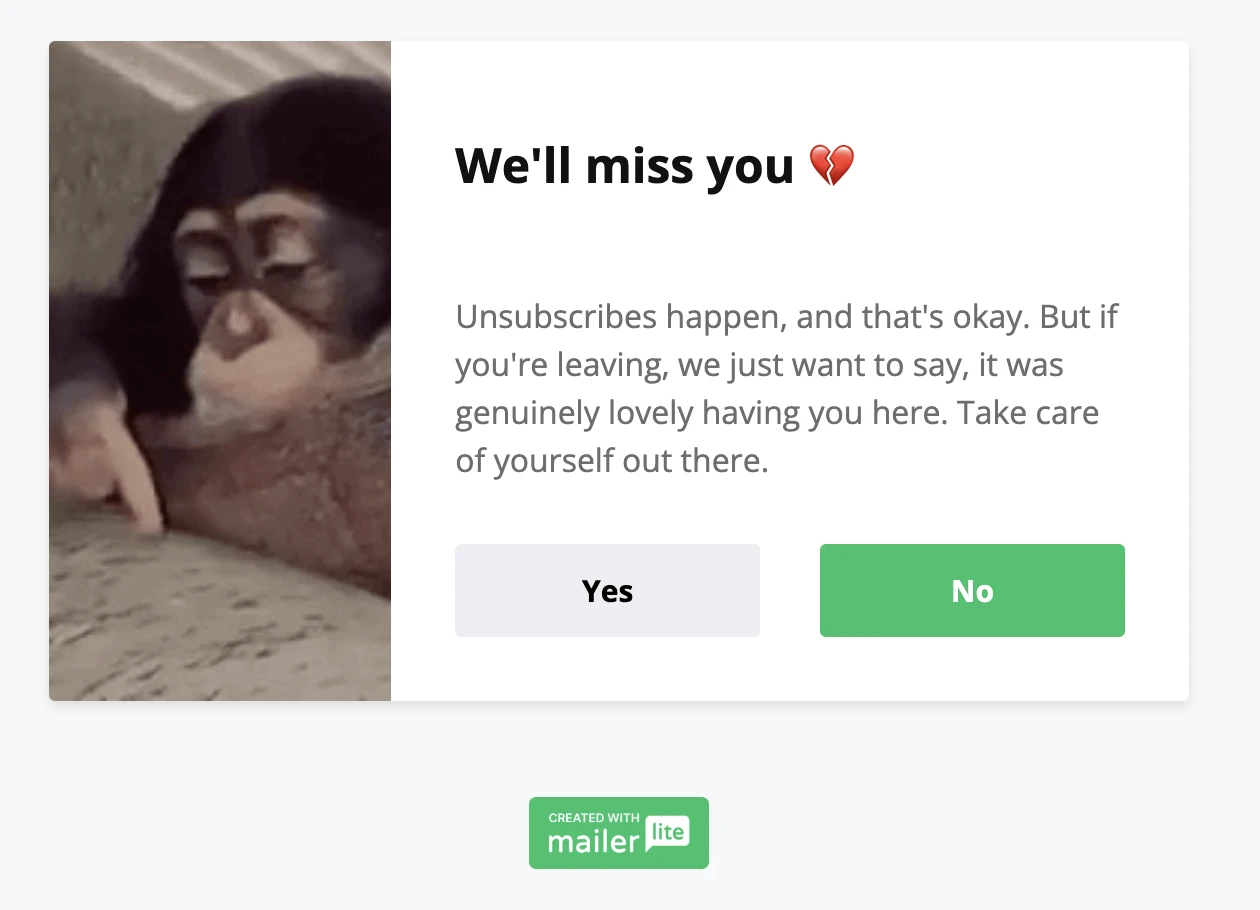
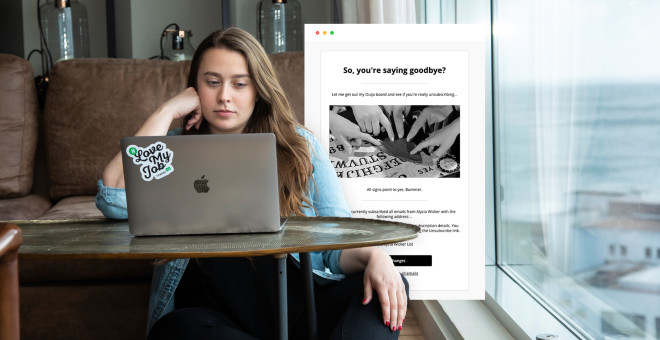
A warm, human unsubscribe page can go a long way. Think: a photo of the person behind the newsletter, a lighthearted line about missing them, or a GIF that makes the moment feel less transactional.
This approach works particularly well for solo creators and personal brands. It reminds the reader there's a real person on the other side, and sometimes that's enough to make them reconsider.
MailerLite tip: Use the Image and content block to add a personal or funny photo alongside a short, genuine message. Keep the tone warm, not desperate.
For more ideas on how to build a great unsubscribe page, check out our guide:
2. Give them an exclusive reason to stay
If your business model supports it, the moment before someone leaves is actually a decent place for a compelling offer. Offer them a discount, a free resource, or early access to something upcoming.
You’re not bribing people to stay on a list they don't want to be on; rather, you’re giving genuinely interested subscribers a concrete reason to reconsider when they might just be on the fence.
3. Remind them what they'll miss with a newsletter archive
Show unsubscribers a snapshot of what your newsletter has delivered: popular past issues, testimonials from engaged readers, or subscriber milestones. This works well if you have genuinely relevant content in your archive.
4. The "feedback first" (minimalist survey)
Sometimes, the most respectful unsubscribe page is also the most effective one. No bells and whistles, just a clean, simple survey with clear options, a brief thank-you message, and an easy confirmation.
This approach signals that you value the reader's time and their honest feedback more than a last-ditch retention attempt, ultimately enhancing the user experience. It also tends to generate more survey results because there's nothing to distract from the question.
Stay on brand with color and fonts: Your unsubscribe page should feel like it belongs to the same brand as your emails
Add a resubscribe button for accidental clicks: This is a quick win. MailerLite's Add resubscribe button option takes about 10 seconds to enable and can recover subscribers who clicked the wrong thing. Worth it every time
Invite them to follow your brand on social media: Add Social links to your unsubscribe page so people who unsubscribe can stay connected in a lower-commitment way
Balance text and visuals: Don't let the page become a wall of text or a confusing collage. One clear message and one visual should be enough
Design for mobile: A significant portion of your subscribers are reading (and unsubscribing) on their phones. Preview your page on a mobile viewport before publishing
Other tips to get more from your unsubscribe survey
Keep these simple but powerful tips in mind while building your unsubscribe survey:
Remember the basic accessibility tips
An unsubscribe page should be accessible for everyone. A few basics to keep in mind:
Contrast and readability: Make sure your text color has sufficient contrast against the background, especially for button labels and survey options
Clear link text: Avoid vague CTAs like "click here." Use descriptive text like "Confirm unsubscribe" or "Update my preferences”
Descriptive section headings: If your page has multiple sections, use clear headings that tell screen reader users what each section is about
Avoid guilt-tripping language: Phrases like "No, I want to keep missing out" are a pattern in email marketing that most readers find irritating rather than persuasive. They can also feel manipulative to vulnerable users. Clear, neutral language always performs better in the long run
Test your survey questions
Email marketing platforms like MailerLite offer a fixed set of unsubscribe reasons. But you can still optimize around the survey by testing elements like:
The wording of your page headline (neutral vs. warm)
Whether you include an "Other" free-text option
The order and prominence of your preference center options
Whether a soft "send me less often" option reduces your overall unsubscribe rate
Look for patterns over time and give any change at least 30–60 days to work before drawing conclusions.
Track performance and use analytics to spot trends
Here are some of the important metrics for you to track:
Unsubscribe rate: The percentage of recipients who unsubscribe from a given campaign. Most email marketing tools track this per send
Unsubscribe reasons: This shows you the percentage of people who’ve unsubscribed for the different reasons listed in your unsubscribe survey
Analyze open-ended responses
If you've enabled the "Other" option in your MailerLite unsubscribe survey, you'll start collecting free-text responses. Set aside time every month to read through these responses. Look for:
Repeated phrases or themes
Specific campaigns or content types mentioned
Pay attention to the tone: Are people frustrated, apologetic, or just moving on?
Even a handful of specific comments can surface valuable insights for you to work on and improve.
Don't let them go without a fight
Unsubscribes are inevitable. But with a well-designed unsubscribe page, a clear survey, and a habit of actually acting on the feedback you collect, they become one of your most useful inputs rather than just a number to minimize.
The best part? Most of what's covered in this guide takes an afternoon to set up, and they’d significantly boost your marketing efforts. A resubscribe button here, a preference center there, a thoughtful piece of copy on your success page are small changes that compound over time into a meaningfully lower churn rate and a healthier, more engaged email list.
Ready to customize your unsubscribe page? Head to Unsubscribe settings in MailerLite and see what's possible. We'd love to see what you build. Share your results in the comments!