How many links should an email have for more clicks and sales? 300,000+ campaigns analyzed

 Ernesta, Legal team lead, and Bob, SRE team lead.
How many links in an email lead to the most clicks and orders? It’s a common email marketing debate: some people swear that multiple links mean more sales; others say that emails with a single link perform best.
To find out which side is right, we analyzed the results of over 317,000 campaigns and 2.9 billion sent emails to discover whether the number of links in an email impacts engagement and orders.
It turns out it does!
Key takeaways
Emails with 2 to 5 links have the highest click rate, 8.9% higher than average
Emails with 2 to 5 links have the highest conversion rate
Emails with 2 to 5 links have the highest open rate, 3.1% higher than average
Emails with over 20 links have the highest click-to-open rate (CTOR), 16.67% higher than average
Emails with a single link get the most orders per click, 37.5% higher than average
Emails with a single link have an 8.9% lower click rate than average
Orders per click decrease the more links you add to the email
Emails with over 20 links have the lowest open rate, 9.86% lower than average
Single vs. multiple links: Why the disagreement?
Many email marketers say that the best way to generate clicks and orders is to write emails with just a single offer and link.
The theory is that this keeps the entire email focused on one call to action (CTA), encouraging people who read the message to click and order.
The other thesis is that adding multiple links to an email drives more action. You can add more products to appeal to a higher percentage of your list.
Since more subscribers have more options, the idea is that they are more likely to find something they like, click and buy.
We analyzed over 300,000 campaigns to find the answer
We analyzed the results of over 317,000 email campaigns and 2.9 billion sent emails. We looked at accounts with at least 5 orders from a connected e-commerce store or a MailerLite digital product. Automated emails aren’t included in this data set.
We grouped these emails into 6 groups depending on how many unique URLs they contained: 1, 2 to 5, 6 to 10, 11 to 15, 16 to 20, 21 and over.
To put the focus on the email content, we discounted all unsubscribe links, as well as those in the email’s header and footer. We only tracked unique URLs, which means emails may have included the same link multiple times.
When analyzing how emails impact orders, we further filtered the data to only include emails that resulted in sales, so the dataset didn’t include non-promotional emails. But some promotional emails that didn’t result in any sales may have been missed.
Emails with 2 to 5 links get the most clicks
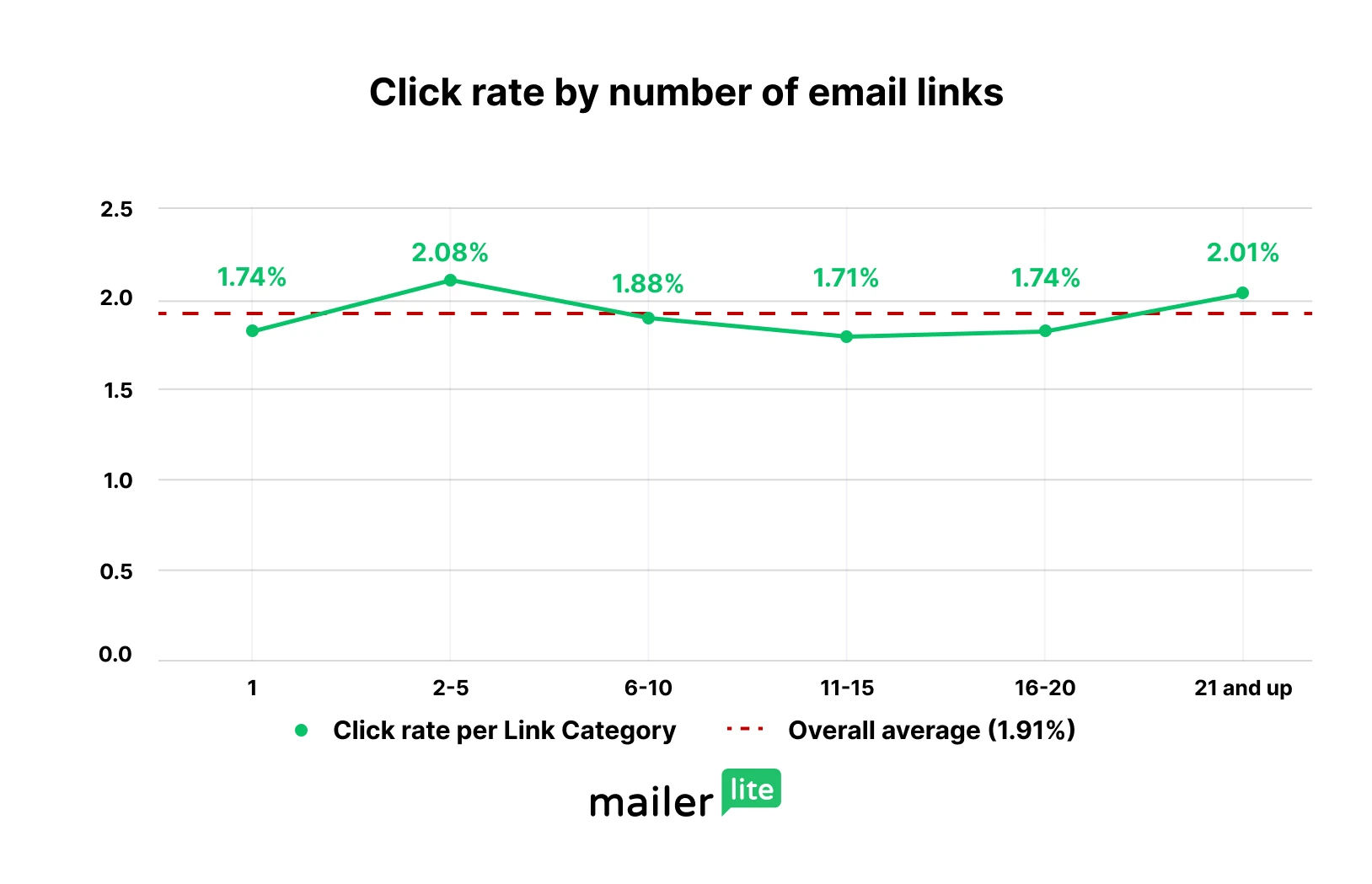
With a click rate of 2.08%, emails with 2 to 5 links have a higher click rate than any other category. The click rate was 8.9% higher than the average in our dataset and 19.54% higher than emails with a single link.
Emails with 2 to 5 links performed well because these emails combine the highest open rate of 34.17% with a very high click-to-open rate of 6.08%.
Emails with over 20 links have the highest click-to-open rate
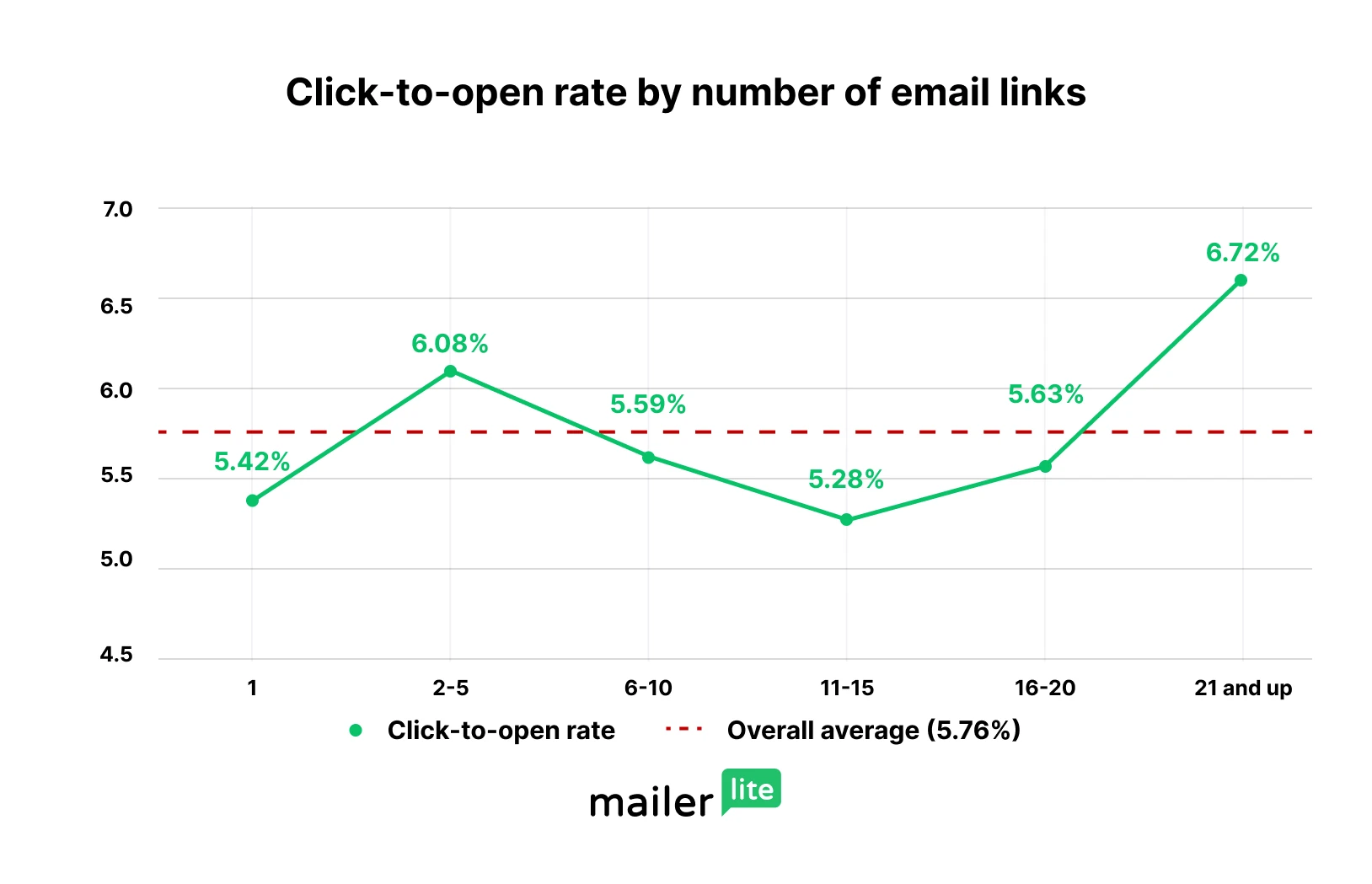
Our data showed that with a CTOR of 6.72%, emails with over 20 links were most likely to be clicked on once opened.
This CTOR was 16.67% higher than our average and 23.99% higher than emails with a single link.
But before you rush out to pack your emails with links, there’s a big downside to this tactic: as shown in the section below.
CTOR measures the percentage of the people who open your email who also click on it. Click rate, also known as click-through rate, measures the total percentage of recipients who click on the email. Learn more about the most important email marketing metrics to track here.
Open rate decreases as you add more links
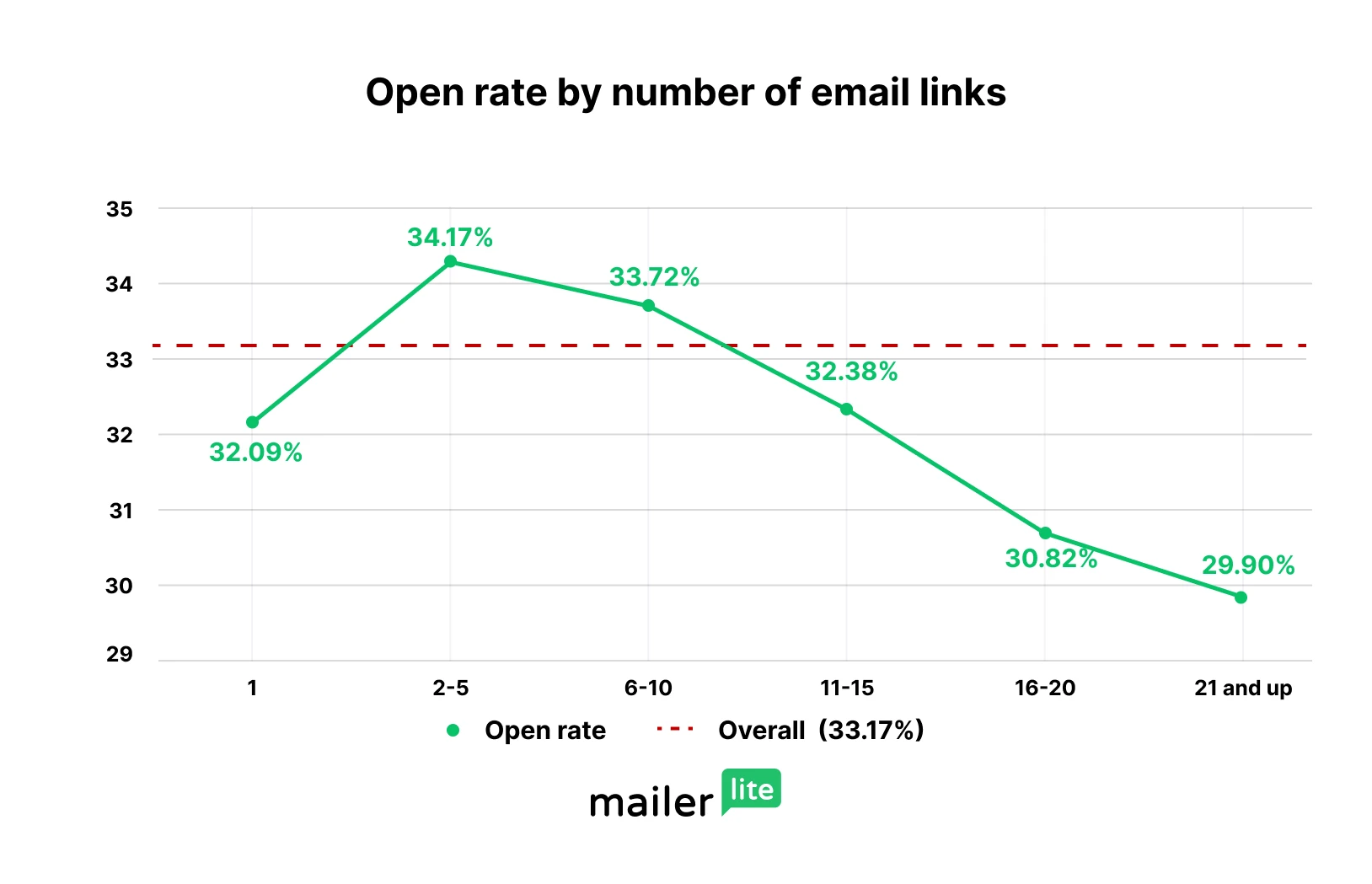
At 29.9%, emails with over 20 links had the lowest open rate of any set of emails. That’s why, despite having such a high CTOR, these emails only had the second-highest click rate. Emails with 2 to 5 links had the highest open rate, at 34.17%.
In fact, after peaking in emails with 2 to 5 links, email open rate decreases significantly as you add more links. It’s also worth noting that emails with a single link had the third lowest average open rate.
An email’s content shouldn’t impact its open rate: after all, people only see the content once they’ve already opened the email.
But, there are secondary reasons why the number of links in an email could impact open rate:
Targeting: An email promoting a single product may appeal to a lower percentage of a list than one promoting multiple offers. Imagine a subject line asking people to check out our latest courses, vs one asking people to check out our email marketing design course. Likewise, an email packed with links might not truly appeal to anyone.
Deliverability: Emails with a high number of links may be more likely to end up in the promotions folder. Fewer people seeing the message would lead to fewer people opening it.
If you're struggling with getting people to open your emails, click here to learn 11 strategies to increase your open rate.
Emails with a single link get 8.9% fewer clicks than average
Not only did emails with a single link not get the most clicks, but they actually had a click rate that was 8.9% lower and a click-to-open rate that was 5.9% lower than the average in our data set.
In terms of generating overall clicks and generating clicks when someone opens, only emails with 11 to 15 links performed worse.
But…
Emails with a single link get by far the highest orders per click
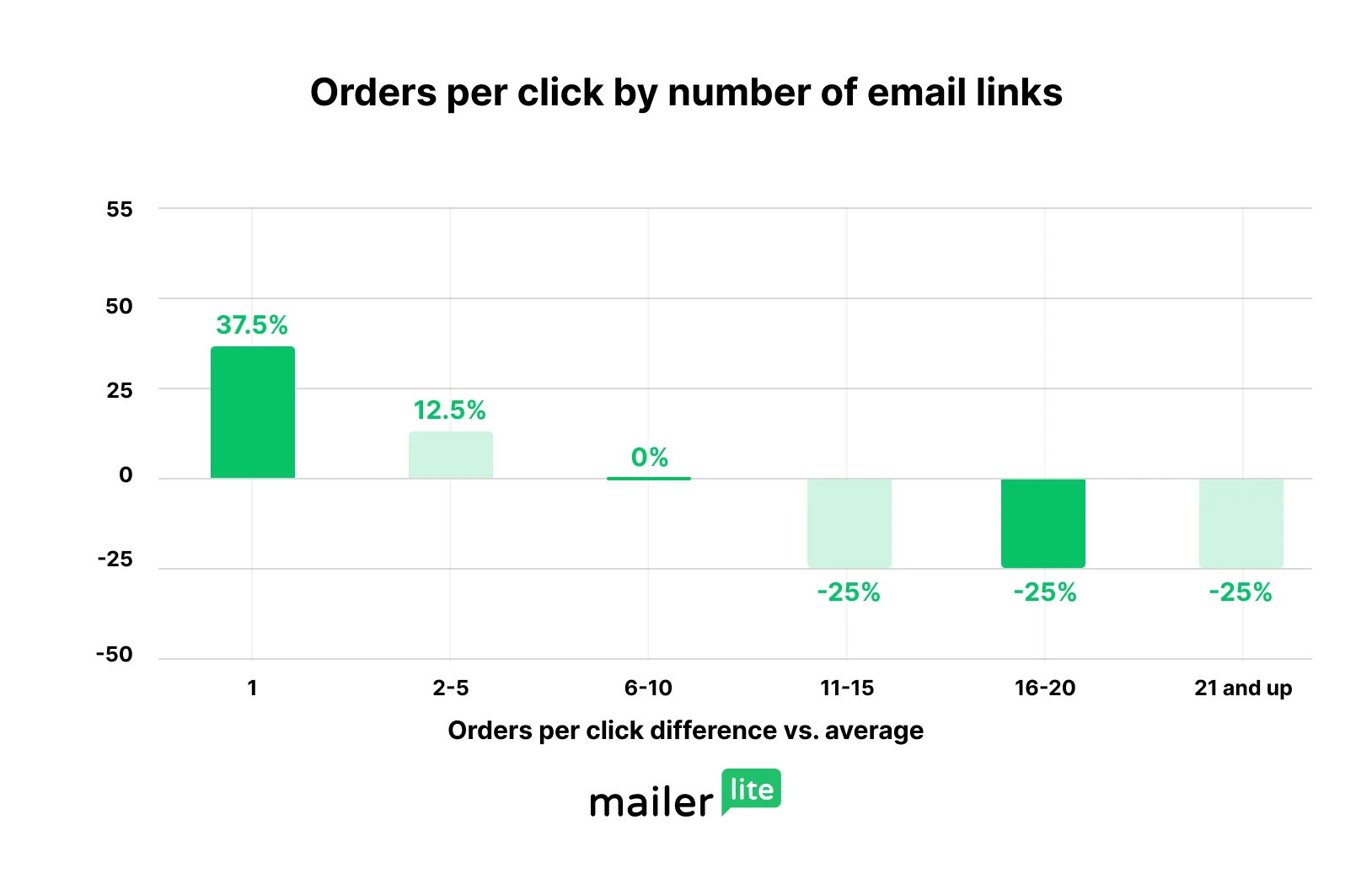
Emails with a single link received an incredible 37.5% more orders per click than the average in our dataset.
This was also 83.33% more orders per click than the lowest-performing categories, which were all those with more than 11 links.
Want to know what’s causing this mismatch? We share some ideas in the takeaways section below.
Orders are attributed to a campaign when a subscriber opens an email, clicks to the store, and makes a purchase within 30 days. Purchases are attributed to the last campaign the subscriber clicked on.
Emails with 2 to 5 links have the highest conversion rate
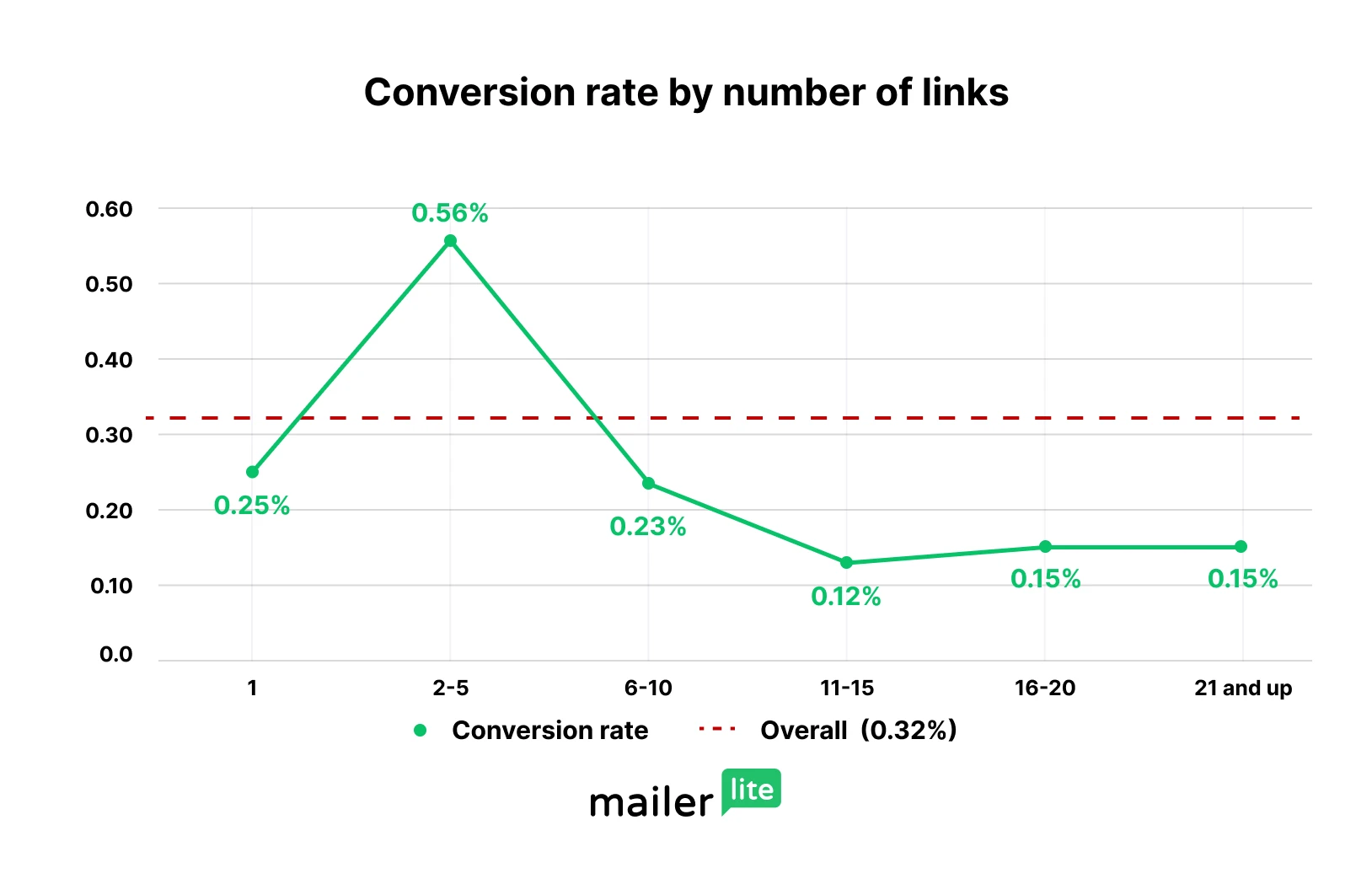
Conversion rate is the percentage of email recipients who go on to make an order.
As well as having the highest click rate and open rate, emails with 2 to 5 links also have the highest conversion rate at 0.56%. This is 75% higher than the average in our data set.
This is exciting news for anyone building a list. It means that if you have 1,000 subscribers, you can expect 5.6 sales every time you hit send. And if you have 10,000 people on your list, you can expect 56 to buy!
Emails with a single link and then emails with 6 to 10 links had the next highest orders per recipient, while emails with more than 11 links performed poorly according to this metric.
Do emails with more links go to the promotions folder?
Our data doesn’t show whether emails with more links go to the promotions folder. But that could certainly help explain why open rates decrease so drastically as you add more links.
It makes sense, too, since promotional emails are far more likely to include a large number of links than personal ones. If Gmail knows this, it may send these emails to the promotions tab.
It’s worth noting that an email’s spam complaint rate stays under 0.01% no matter how many links you include.
Does adding more links cause people to unsubscribe?
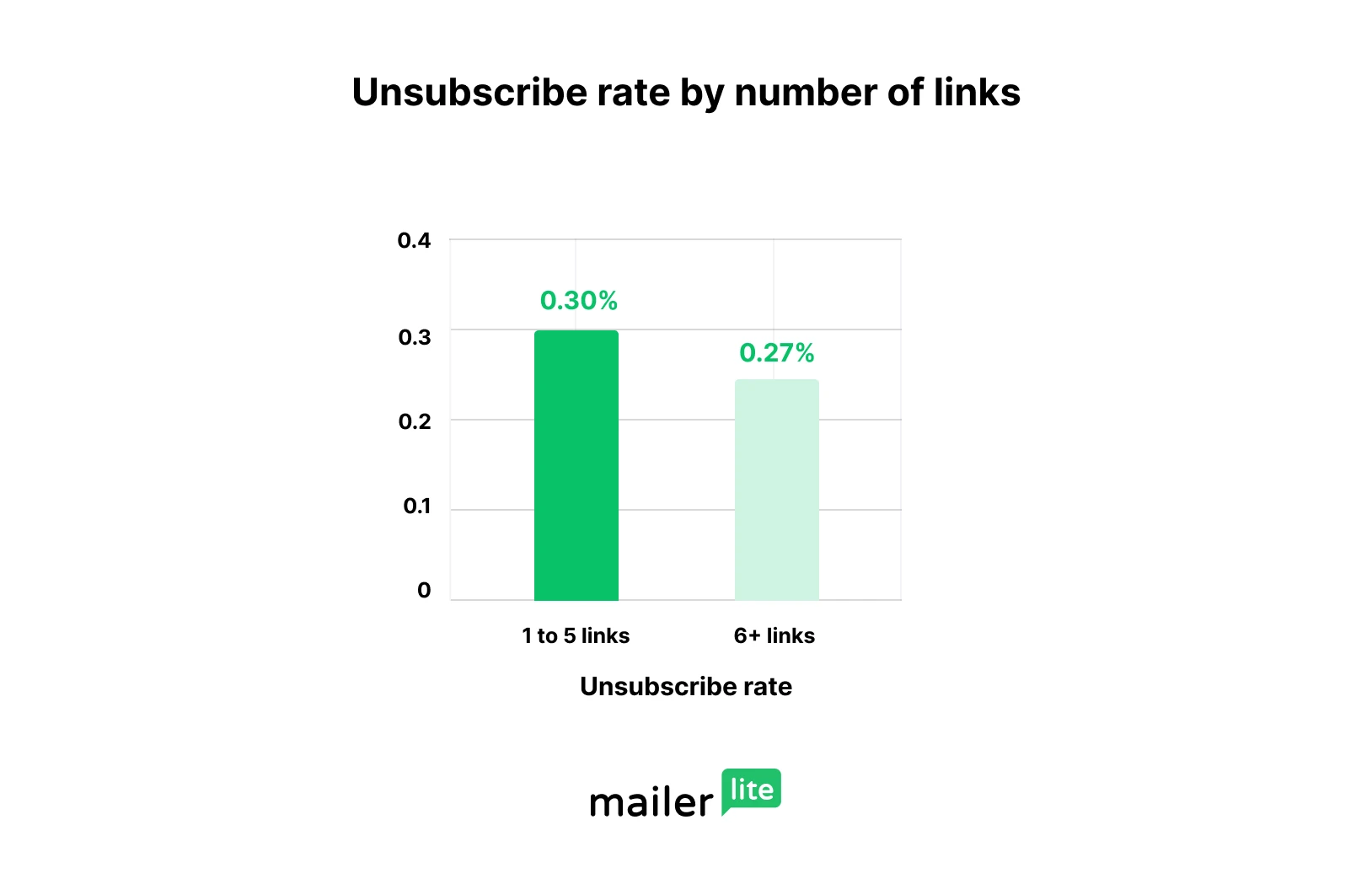
Unsubscribe rate actually increases slightly when you use fewer links. This is likely due to these emails having a higher open rate, so more people see them, which means more opportunities for people to unsubscribe.
The good news is that the average unsubscribe rate is super low, no matter how many emails you include. It stands at just 0.30% for emails with under 5 links and 0.27% for emails with more than 5 links.
Do more links result in more sales? Key takeaways
Now you’ve seen the data, here’s how to use it to boost the impact of your next campaign.
For maximum orders, use 2 to 5 links
If you simply want to maximize the orders you get from your emails, the data suggests that you should include 2 to 5 links.
We guess that this is because it lets you include a variety of offers that appeal to a higher percentage of your subscribers, resulting in more opens, clicks and purchases. But, the emails don’t have so many links that open rates start being affected.
Use single-link emails for targeted promotions
If you have a single offer that you want to promote, it makes sense to write a dedicated email and include a single link to the offer.
You may end up with fewer people opening the message, since the offer may only appeal to a segment of your email list. But the data suggests that those who open the email and click on the offer are far more likely to go on and hit purchase.
You could also use segmentation so only the people likely to be interested in the offer see it. Targeted emails get 36.69% more opens and 267.21% more clicks than non-targeted campaigns
Consider adding more links when appropriate
While emails with over 20 links had a very high click-through, the low open rate and low orders per recipient make them hard to recommend.
But, if you can find an appropriate time to use them, maybe an annual sale where lots of products are discounted, these emails can clearly be effective.
Final thoughts: You can make it work at any level
While digging through the numbers, it became clear that businesses can generate sales and engagement with any number of links.
While the average conversion rate was low, plenty of campaigns sent with over 10 links performed extremely well. Some campaigns received hundreds of sales with an average number of orders per subscriber of over 0.01. That’s one sale for every hundred subscribers!
Likewise, we’ve heard from enough experienced email marketers who have spent years running their own tests to know that sending emails with a single link can be an effective strategy too.
With that in mind, be sure to test what works for your audience and product. Use email campaign reports to see what gets people clicking and buying, or use A/B testing to put 2 versions of an email together and see what works.