17 abandoned cart emails to win back lost sales

 Davy, tax specialist (left) and Martin, CFO (right).
If you’re looking to boost e-commerce sales, abandoned cart emails are extremely effective. Their ease of setup, high conversion potential, and low ongoing maintenance mean we recommend that every online store set one up if they can.
In this article, you’ll learn everything you need to know to create effective abandoned cart emails. We’ll start with clarifying what they are, before moving on to 17 examples to inspire your emails, then covering essential abandoned cart best practices and showing how to create an abandoned cart sequence in MailerLite.
What are abandoned cart emails?
Abandoned cart emails go out to shoppers who add an item to their cart but never finalize the purchase. They are automated emails and are typically sent around an hour after the customer added the product to the cart, assuming they haven't yet made a purchase.
Abandoned cart emails usually includes a link to the product and some information about why the customer should buy. Basically, anything that is likely to get the shopper back to the cart.
Some stores go beyond a single email and create an entire multi-email sequence designed to get the shopper to convert. Sending multiple emails can be more effective than a single email, but also has a bigger potential to annoy the customer, so use multi-email sequences with care!
Abandoned cart emails are very effective
Abandoned cart emails are extremely effective because the recipient has already shown high purchase intent. A well-timed reminder is often all it takes to prompt them to return and complete the transaction.
Additionally, they let you highlight extra incentives and benefits that could push potential buyers over the line.
The stats back this up, too. Our data shows that abandoned cart emails have a 53% open rate and a 12% click rate, meaning a high percentage of people who receive them end up viewing the product. To put that into context, a typical campaign has an open rate of 42% and a click rate of 7%.
Abandoned checkout emails are similar, but not the same
Abandoned checkout emails are similar to abandoned cart emails in that they go out when someone starts the buying process and never hits buy, but the trigger used to send them is slightly different.
While abandoned cart emails go out when someone adds a product to the cart, abandoned checkout emails only go out if someone visits the checkout page too
Both these triggers are useful. You may use abandoned checkout emails over abandoned cart emails if you only want to send reminder emails to people who are very close to buying. Another benefit is that you can send abandoned checkout emails if a new customer enters their email address on the checkout page, while abandoned cart emails are only sent to logged-in users.
Whichever option you choose, MailerLite lets you set up both abandoned cart and abandoned checkout emails. Abandoned checkout emails work with our e-commerce integrations for Shopify, BigCommerce, PrestaShop, WooCommerce, Shoper and Wix. The abandoned cart trigger works with WooCommerce, PrestaShop, Shoper, Wix and the e-commerce API.
17 best abandoned cart email examples
The best abandoned cart emails make it easy for subscribers to complete the purchase while building excitement around the product and brand. There’s no one way to do this, as these 17 abandoned cart email examples show.
1. Combine humor with playful copy: Home Alive Pets
Home Alive Pets got creative in their abandoned cart email with some jovial copy that’s more fun than the generic “you left this item in your cart.”
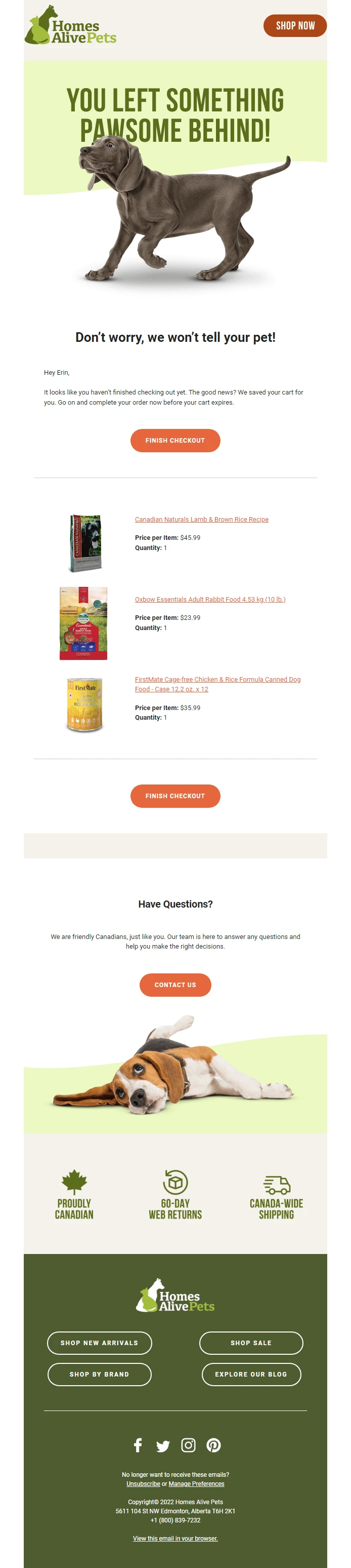
(The pictures of cute puppies are definitely an added bonus too).
2. Gamify recovery with loyalty points: Taco Bell
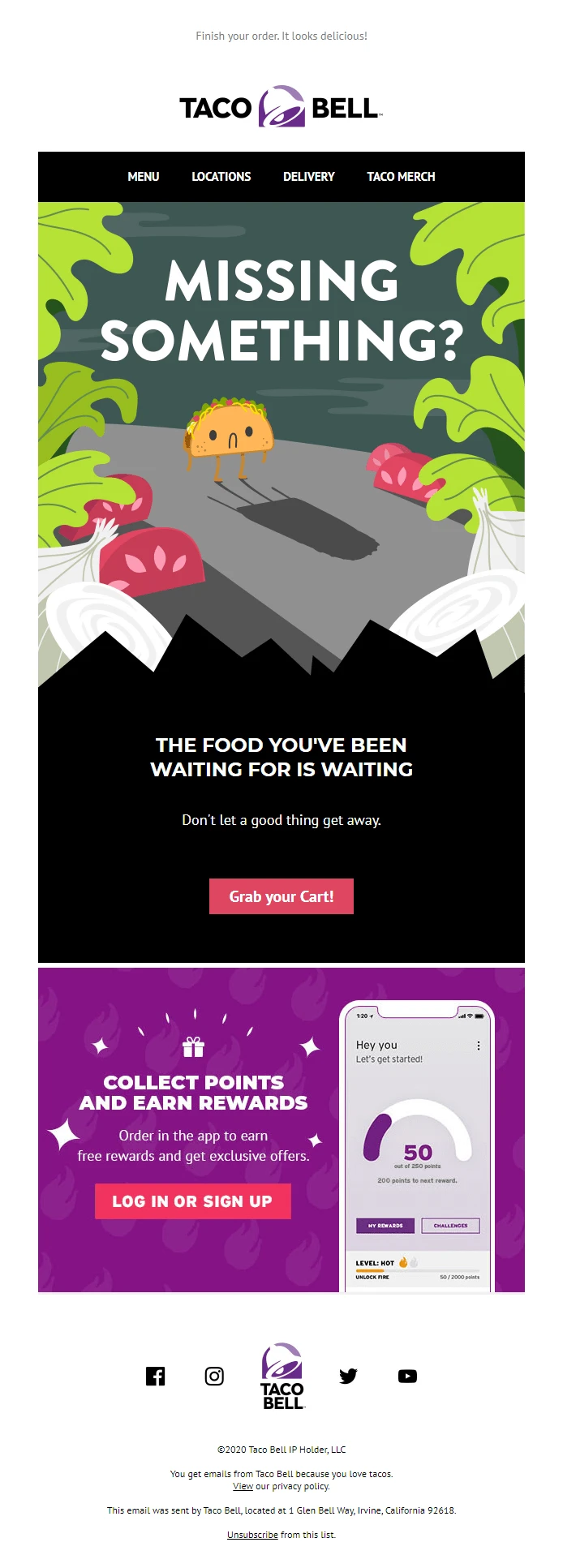
Taco Bell uses creative imagery in its recovery email example to capture the attention of its subscribers. Plus the email highlights that customers earn points when they make an order.
Need email design tips? Learn the best colors for marketing emails to spruce up your email newsletters.
3. Build rapport with witty copy: Whiskey Loot
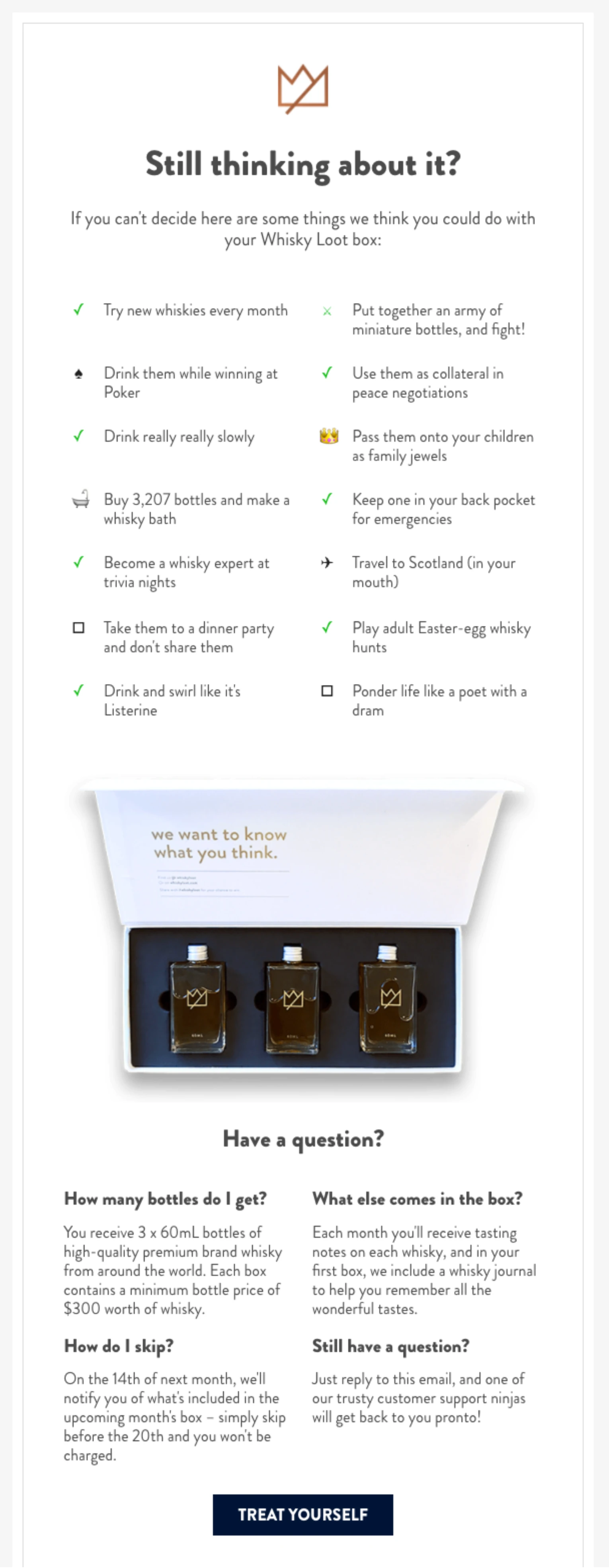
Whiskey Loot takes a creative approach to abandoned cart emails. The witty copywriting builds rapport with subscribers and makes the brand more memorable. The email also has an FAQ section that answers common questions that may stop people from buying.
4. Incentivize with a discount coupon: Pepper
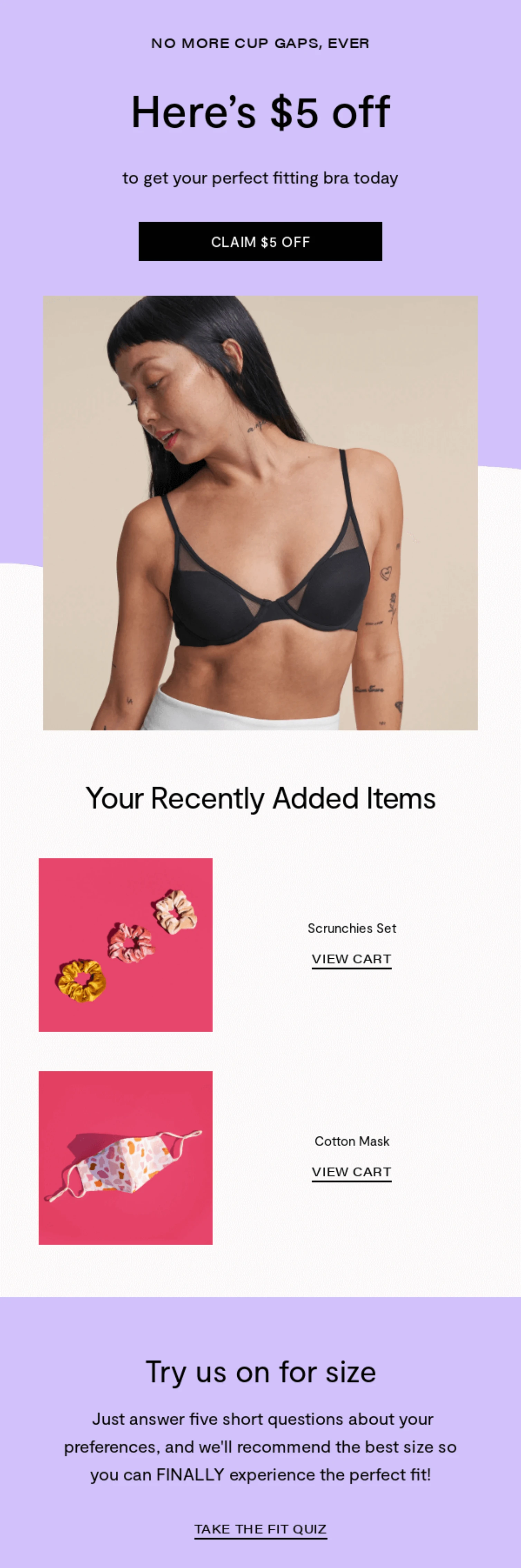
Pepper’s abandoned cart email includes a $5 discount coupon for the selected items. This offer may be all the encouragement the recipient needs to complete the purchase.
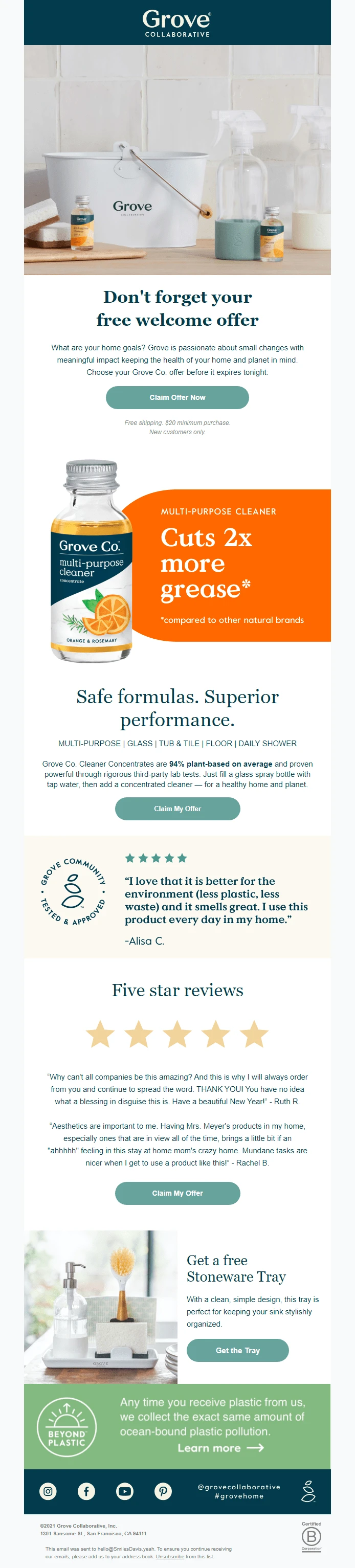
5.Create urgency with limited-time deals: Grove Collaborative
Grove Collaborative reels in new customers by offering buyers a free cleaning set. The brand adds a sense of urgency by highlighting that the deal ends today.
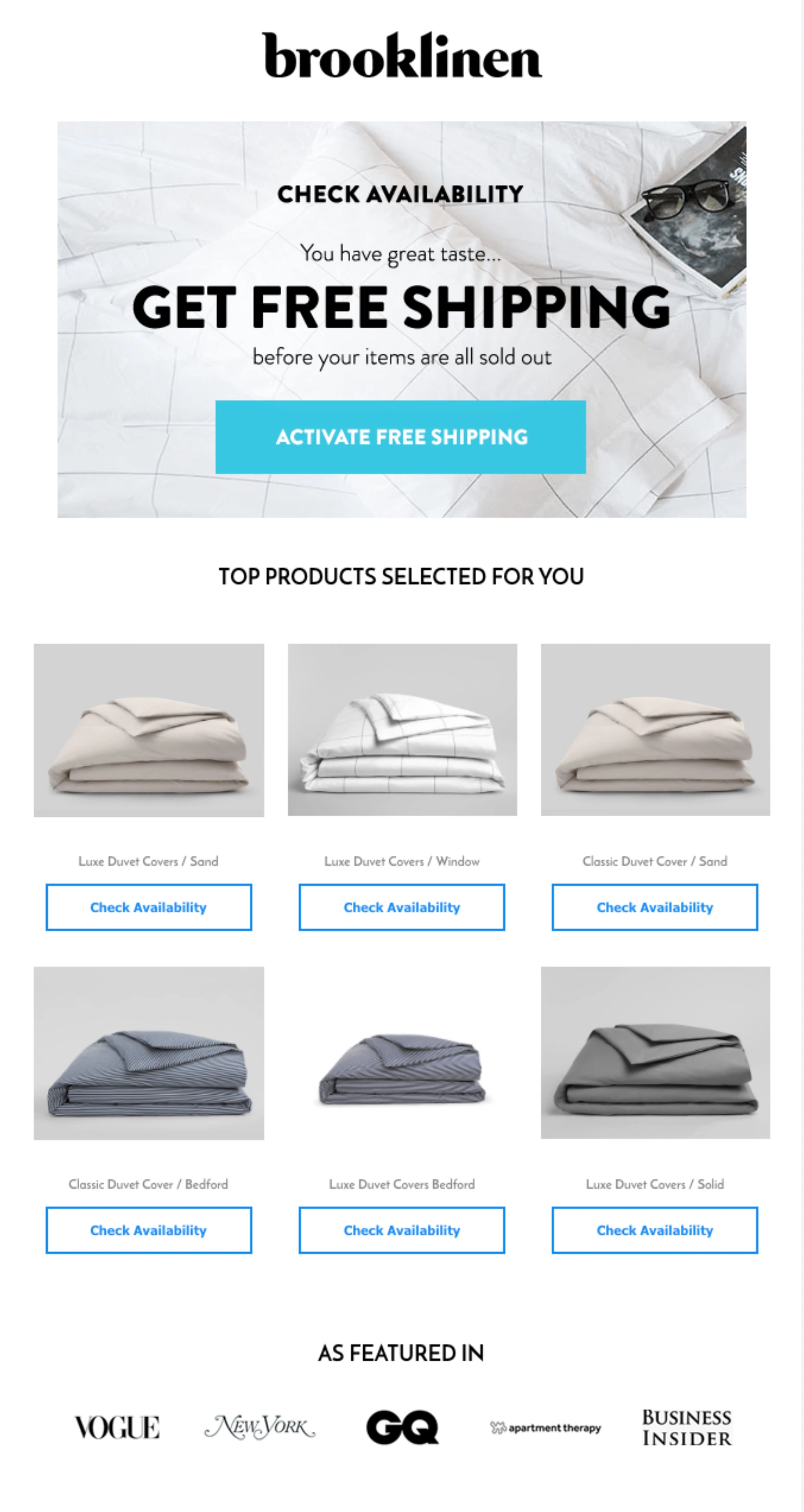
6. Remove hesitance with free shipping: Brooklinen
Unexpected delivery costs are one of the most common reasons shoppers abandon their carts. Brooklinen includes an offer for free shipping in its abandoned cart email, removing this common obstacle to purchase.
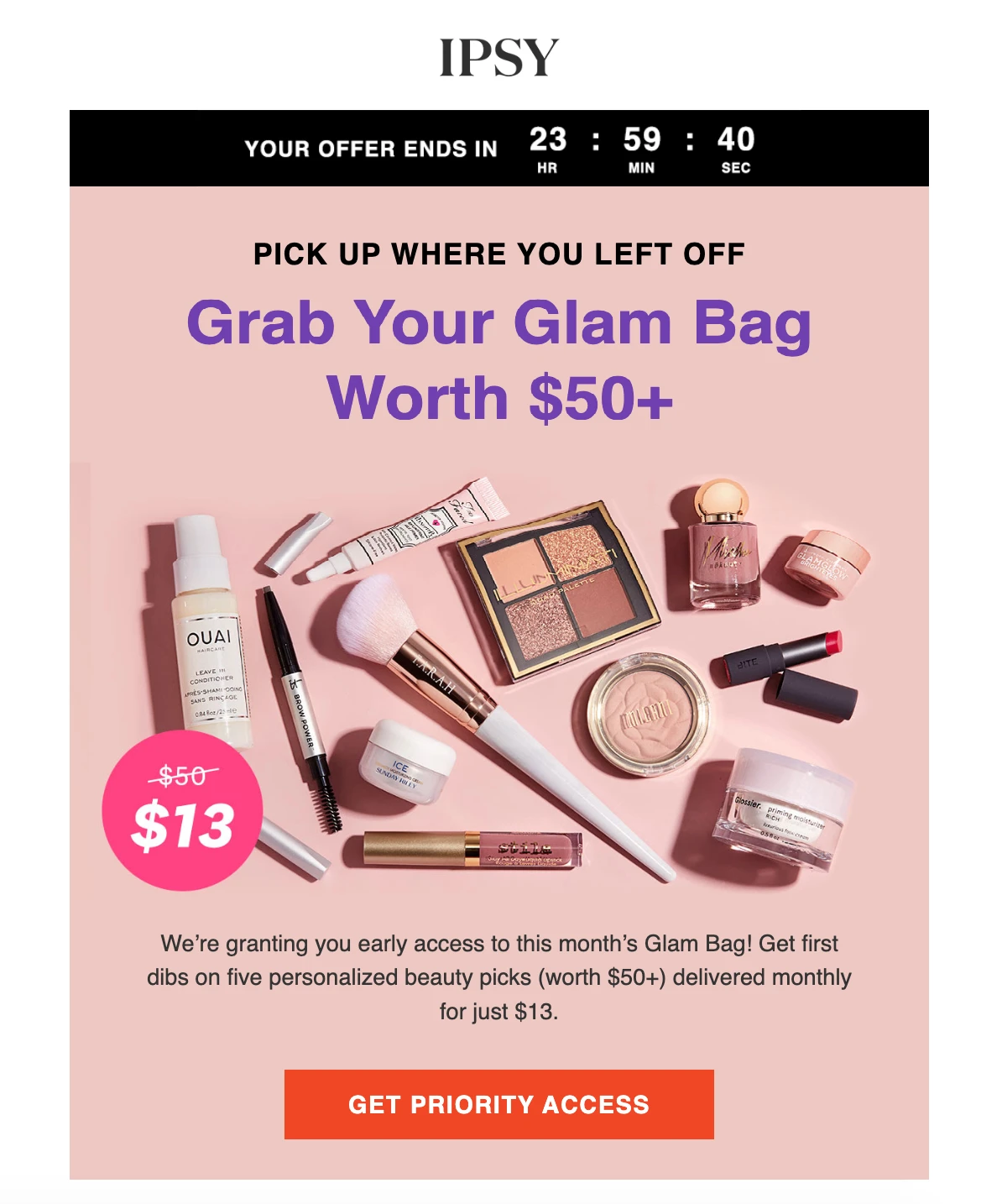
7. Build FOMO with a countdown timer: IPSY
Subscription beauty box service, IPSY, creates a fear of missing out in their abandoned cart email example by offering a limited-time incentive. Their use of a countdown timer makes the offer expiry date extremely clear—subscribers know exactly how long they have before they lose access to the incentive.
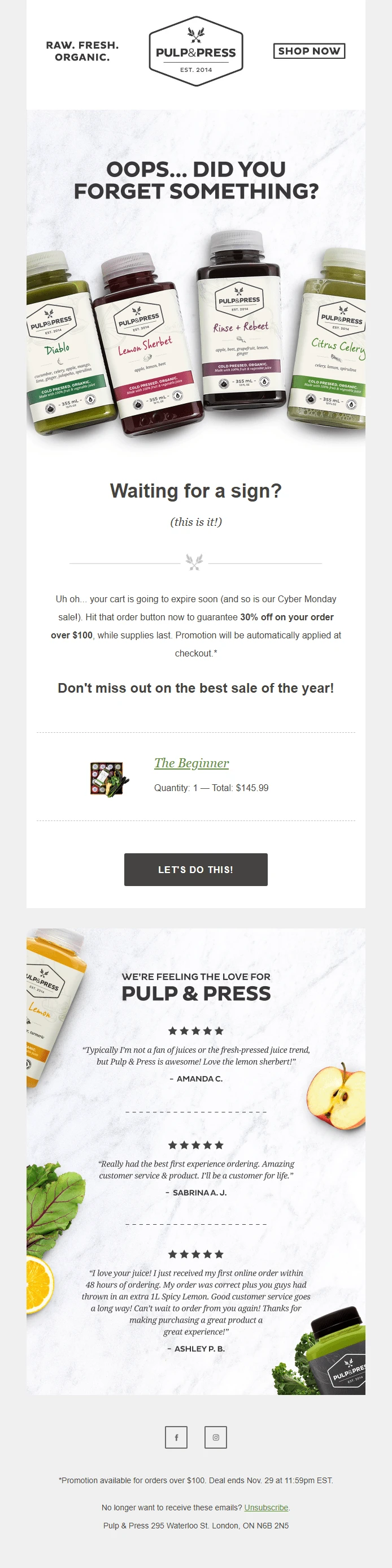
8. Amp up the urgency with expiration warnings: Pulp & Press
Pulp & Press uses two different tactics to generate urgency in their cart abandonment email. First, the brand reminds customers that their cart will expire, and then it mentions that the Cyber Monday sale is coming to an end.
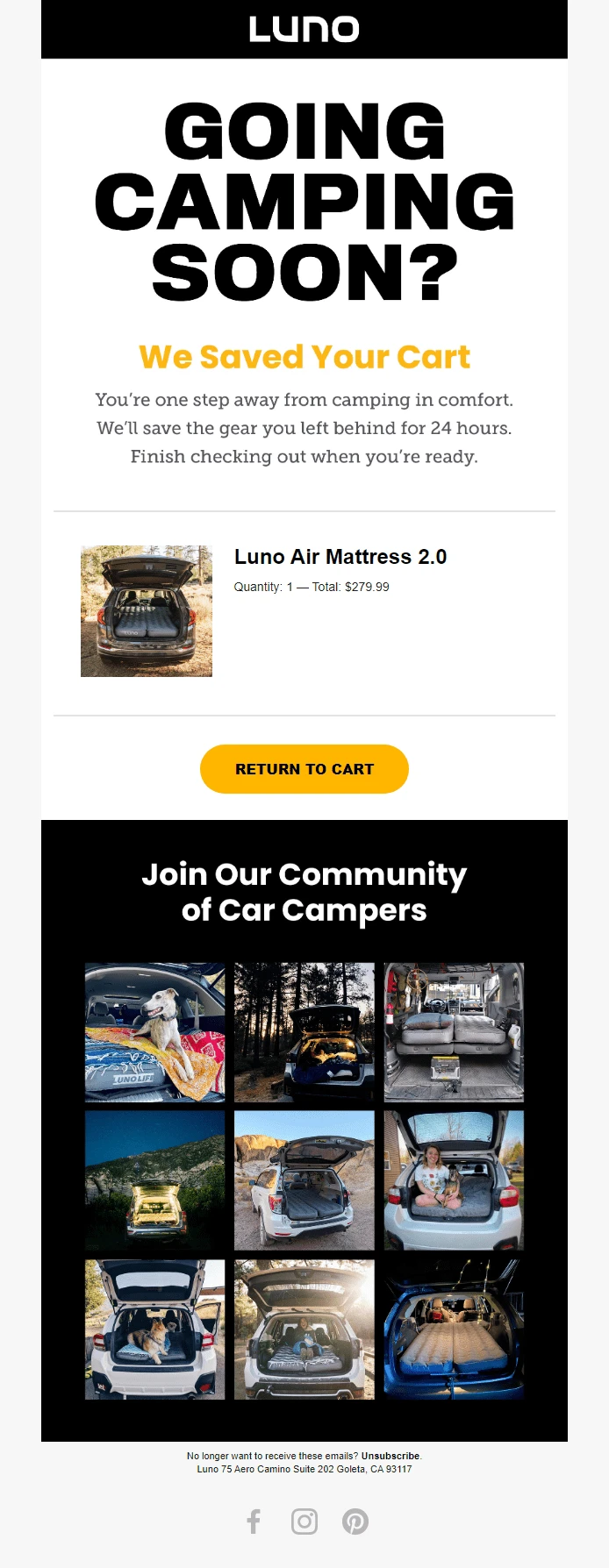
9. Leverage social proof with customer photos: Luno
Luno injects social proof into their abandoned cart email campaign by including social media posts from happy customers. Readers can see the abandoned products in action, which makes it easier to picture themselves using it. And let’s be real, who wouldn’t get a little FOMO looking at those dreamy camping pics!
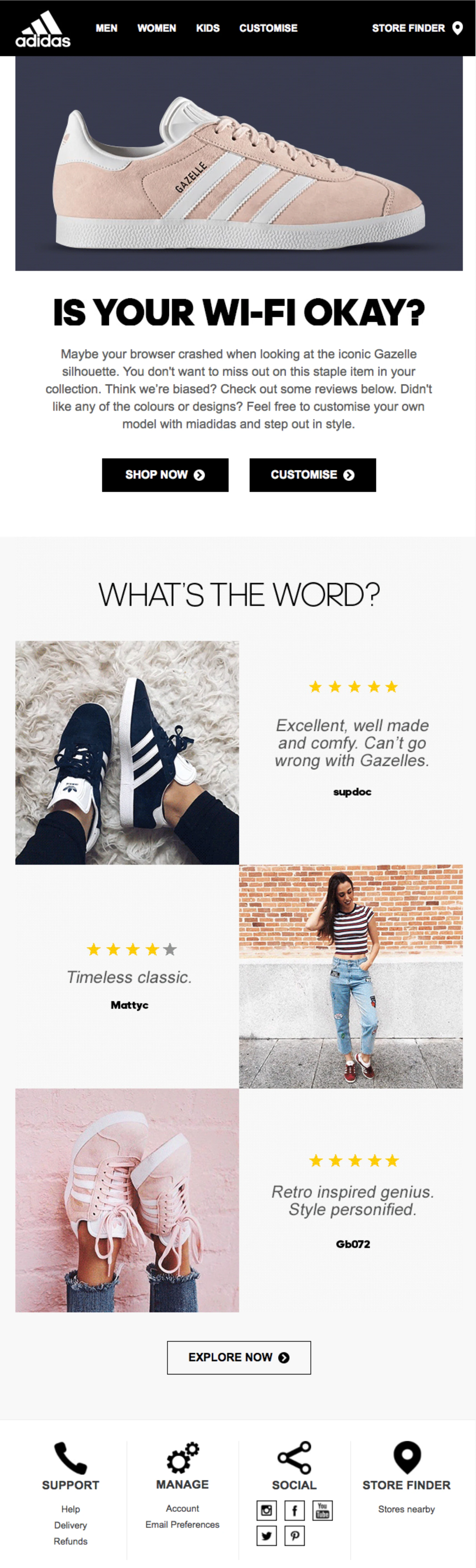
10. Leverage social proof with customer photos:Adidas
Adidas uses 3 prominent customer reviews in its abandoned cart email. Yep, even massively well-known global brands use this tactic to build trust with their audience.
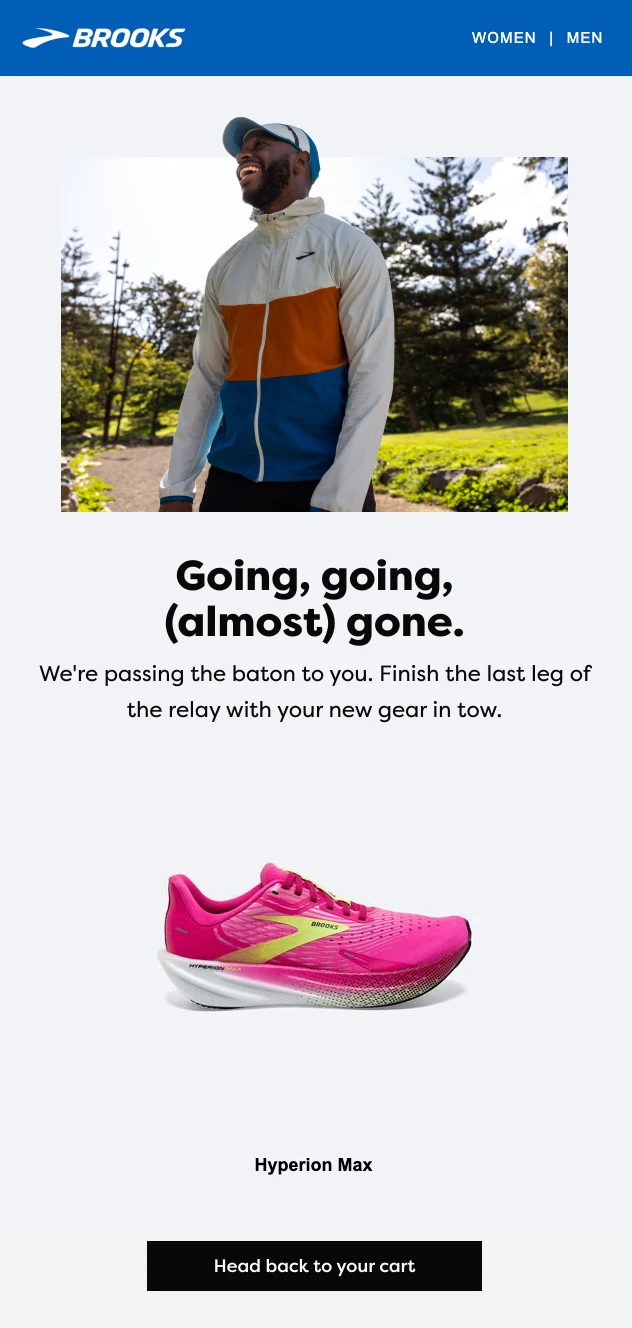
11. Grow engagement with relatable puns: Brooks
Brooks uses a fun, running-related pun in its abandoned cart email copy. This appeals to the brand’s audience and helps the email stand out. The product image and CTA are also super clear and clickable.
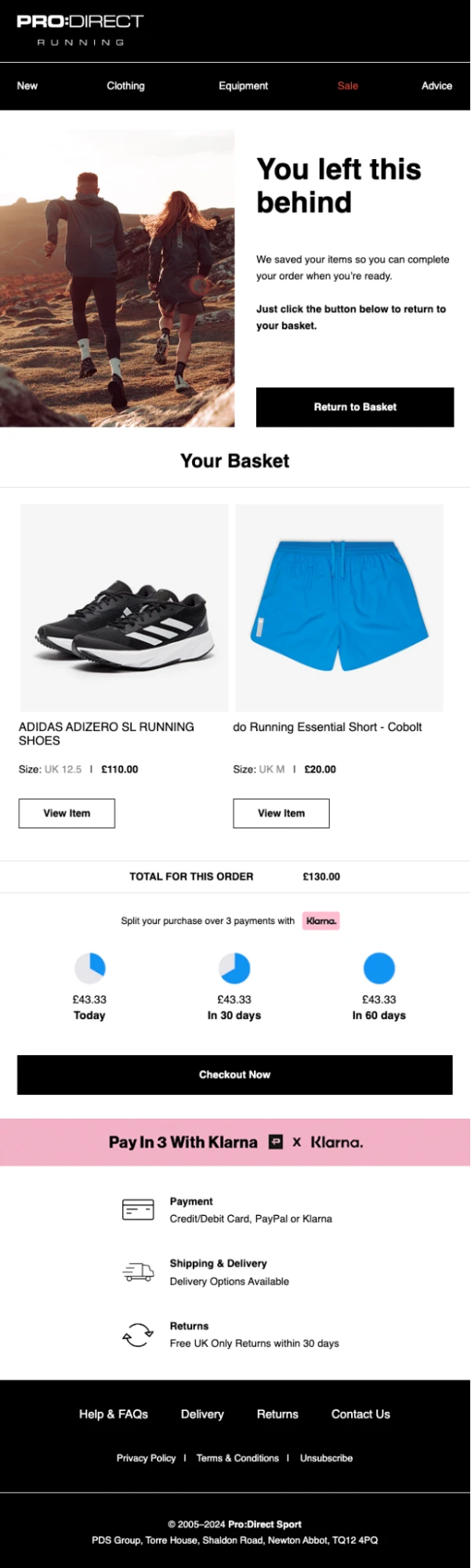
12. Improve affordability with easy payment plans: Pro:Direct Running
Pro:Direct Running highlights that customers can pay for the basket over 3 months. This reduces the amount the customer pays now significantly, which may make the purchase more appealing.
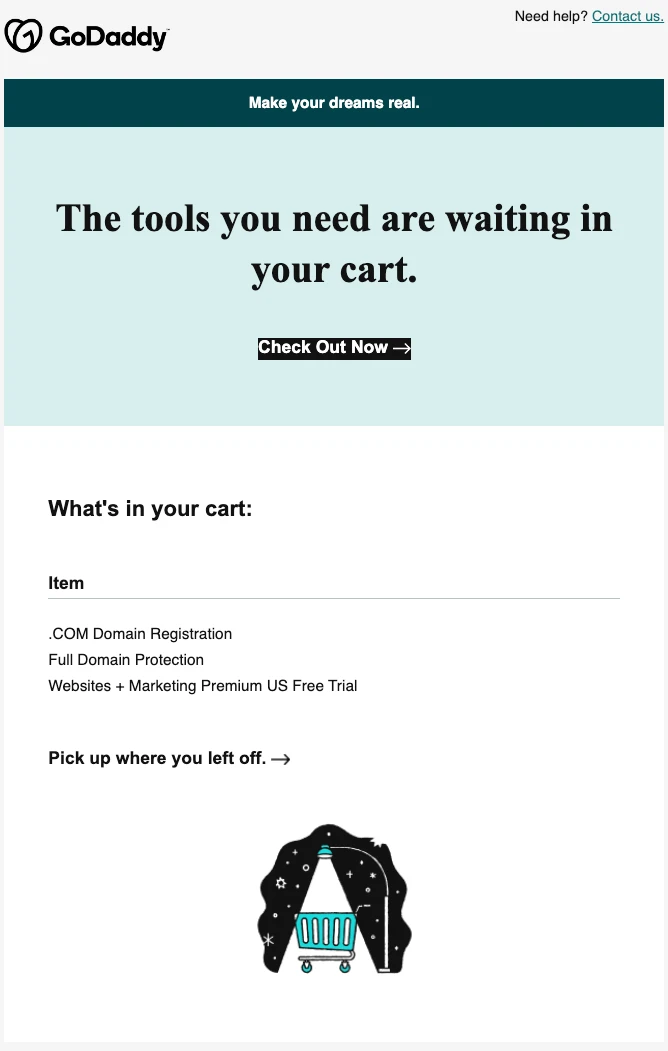
13. Use a 2-step cart sequence: GoDaddy
Abandoned cart emails aren’t just for e-commerce. SaaS tools like GoDaddy use them to encourage visitors to buy too. GoDaddy's abandoned cart email strategy includes an initial email after an hour, then another email the day after the cart abandonment event.
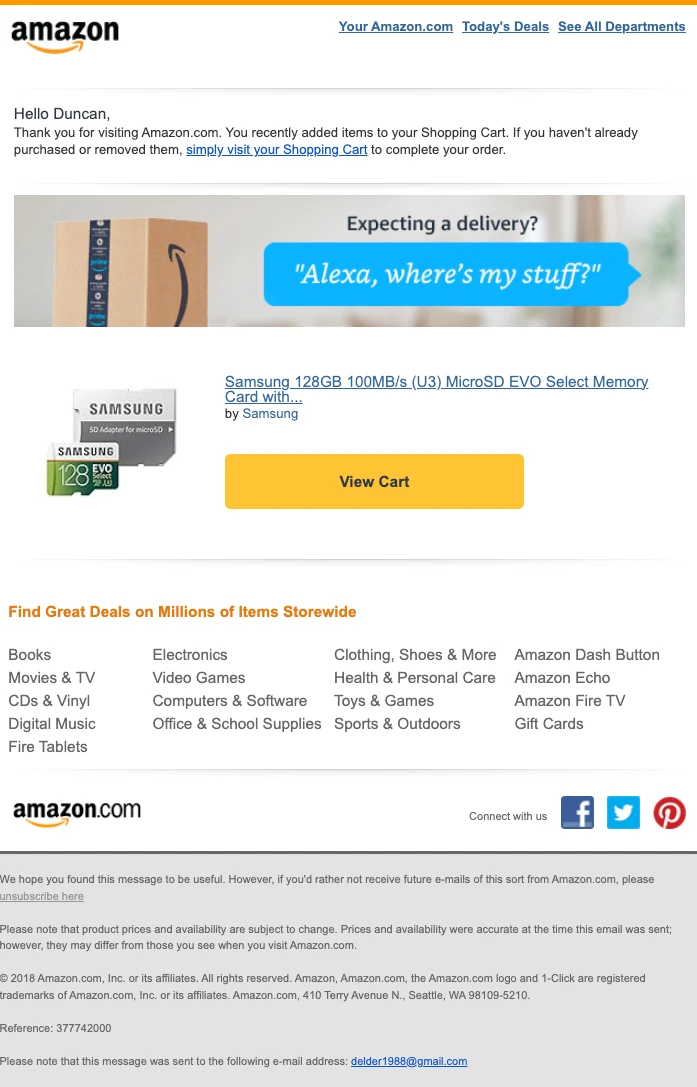
14. Keep it simple and clear: Amazon
That’s right, Amazon is also a fan of abandoned cart emails. The company is well-known for its high conversion rates, so if abandoned carts are working for Amazon, they’re probably worth experimenting with for your e-commerce store too.
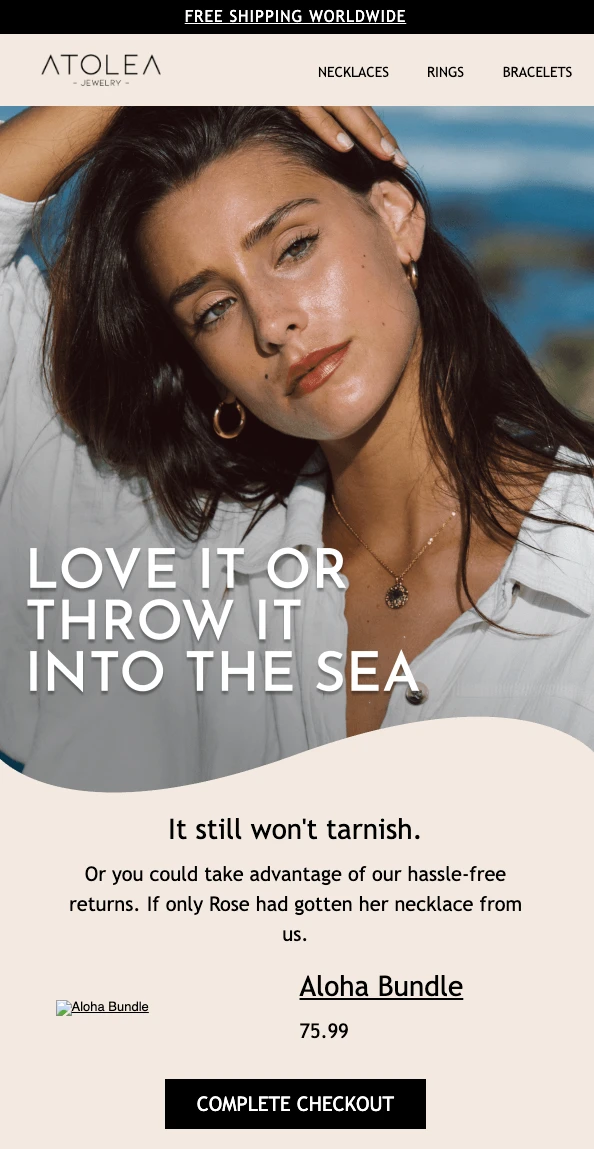
15. Overcome objections with clear benefits (and humor!): Atolea Jewelry
Atolea’s abandoned cart email includes a Titanic joke that appeals to its target audience. It also highlights 2 major benefits of the online store: the fact the jewelry doesn’t tarnish in water, and that you can get hassle-free returns on your purchase.
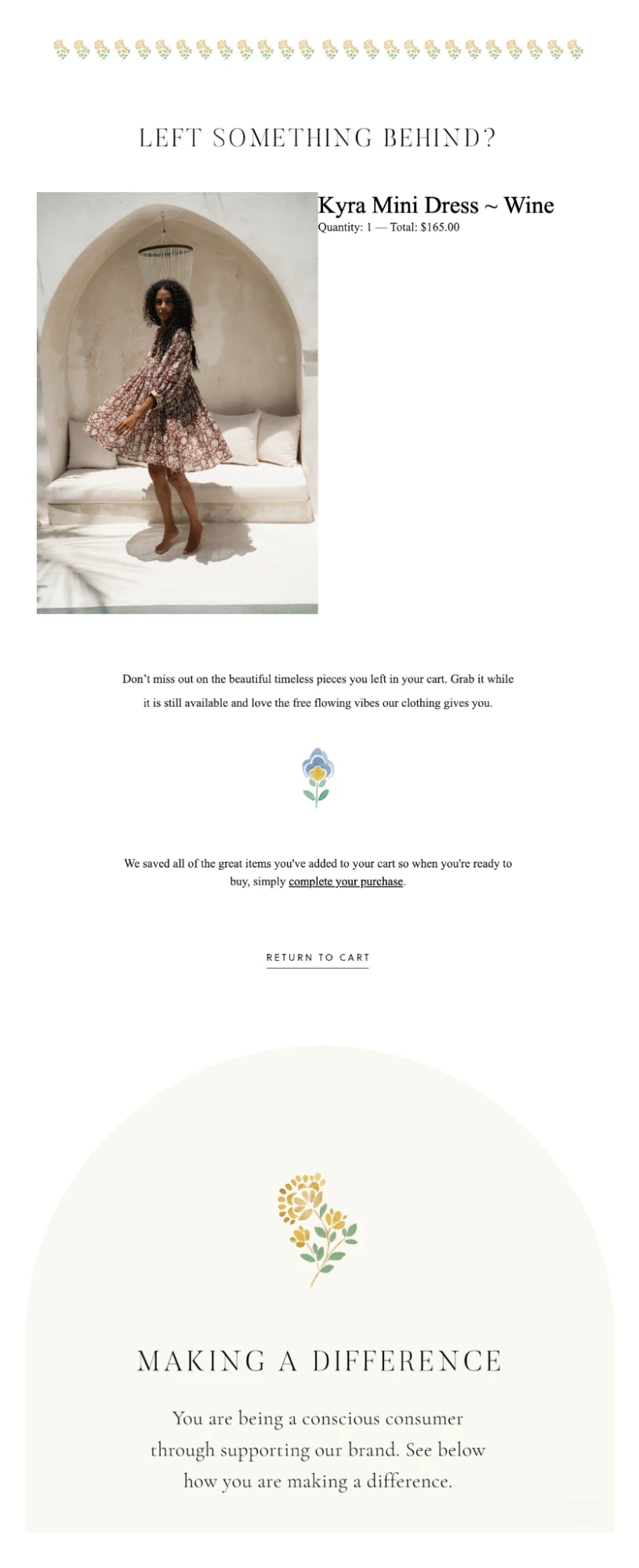
16. Highlight your brand values: Daughters of India
Daughters of India’s abandoned cart email includes the standard product image and link. But it stands out due to the reminder that the brand’s ethical and sustainable business practices mean you’re making a conscious choice when buying from the company.
17. Include personalized recommendations: Hardgraft
Hardgraft’s abandoned cart email stands out as it includes a selection of product recommendations as well as the image of the abandoned item. This combo could increase the value of the final purchase.

Abandoned cart email subject line ideas
Did you know that 43% of people determine whether or not they’ll open an email by its subject line? No pressure, right?
A good abandoned cart email subject line could be personalized, witty or creative. But the most important factor is that subscribers should know what the email is about, and why they should open it.
Check out some powerful and effective abandoned shopping cart subject line examples below.
Your favorites are waiting (but not for long!)
(Name), a quick note on the item you almost bought.
Heads up: Your cart contents are about to be sold out!
We’re holding your order, just in case.
We covered the shipping - just for you! 🫶
Name, did you check out our 5-star review? 🤩
Clock’s ticking: Complete your order with yummy discounts! ⏱️
Before we restock: Finish your purchase
Looking for a sign? We added a little gift. 🎁
Your cart qualifies for a secret discount!
$14 off is waiting in your checkout
Uh oh! Don’t miss out on our bestselling item!
Your cart is feeling lonely…🥺
You have good taste. 😉 Get it at 10% off!
Did you forget something, (name)?
Hey, name! Ready to checkout?
How to create an abandoned cart email sequence
MailerLite makes it easy for e-commerce businesses to send automated abandonment emails with the help of our built-in integrations for leading platforms like Shopify, WooCommerce, BigCommerce, PrestaShop, Wix, and Shoper. You can also create one if you sell digital products with our built-in checkout or if you use our e-commerce API.
With MailerLite, you can set up both abandoned cart and abandoned checkout automations. The abandoned cart trigger fires when a customer adds items to their cart but never starts checkout, and the abandoned checkout trigger fires when they begin checkout but don't complete the purchase
Follow the instructions below to create your workflow. You can also read our help guide on how to create an abandoned checkout email or abandoned cart email for more details.
To set up an abandoned cart workflow, install an e-commerce integration, create a new automation and select the e-commerce trigger “abandoned cart” or "abandoned checkout."

Then you can choose how long after abandonment you want the email to trigger and get to work designing your email! The sequence will automatically trigger every time a subscriber abandons their cart or checkout.
We recommend including up to 3 emails in your sequence. If the customer makes a purchase, they will automatically be removed from the automation before the next step, so they don’t receive unnecessary communication.
Cart reminder email: Send the first abandoned cart email with the item information, social proof or other popular items.
Follow-up email: The second email should be for subscribers who didn’t open or click the first email. You can use a delay step and a condition step to separate your workflow.
Final reminder: If the first 2 emails didn’t work, you can add another delay and an email with a final reminder. You could even add an incentive to the email, such as a discount code to encourage subscribers back to their online shopping carts.
Once set up, it's possible to edit your workflow as many times as you like! If you create a series of emails that don't resonate with your subscribers, tweak your content, delays, images, etc, until you're happy with your recovery rates.
Start with an abandoned cart automation template
If you don't want to set the automation up from scratch, you can use our abandoned cart and abandoned checkout automation templates to quickly create one.
Just choose the relevant template and then tweak it to suit your purpose. Check the templates out in the image below.
Abandoned cart email best practices
As you’ve seen from the examples above, the most effective shopping cart abandonment emails follow similar best practices.
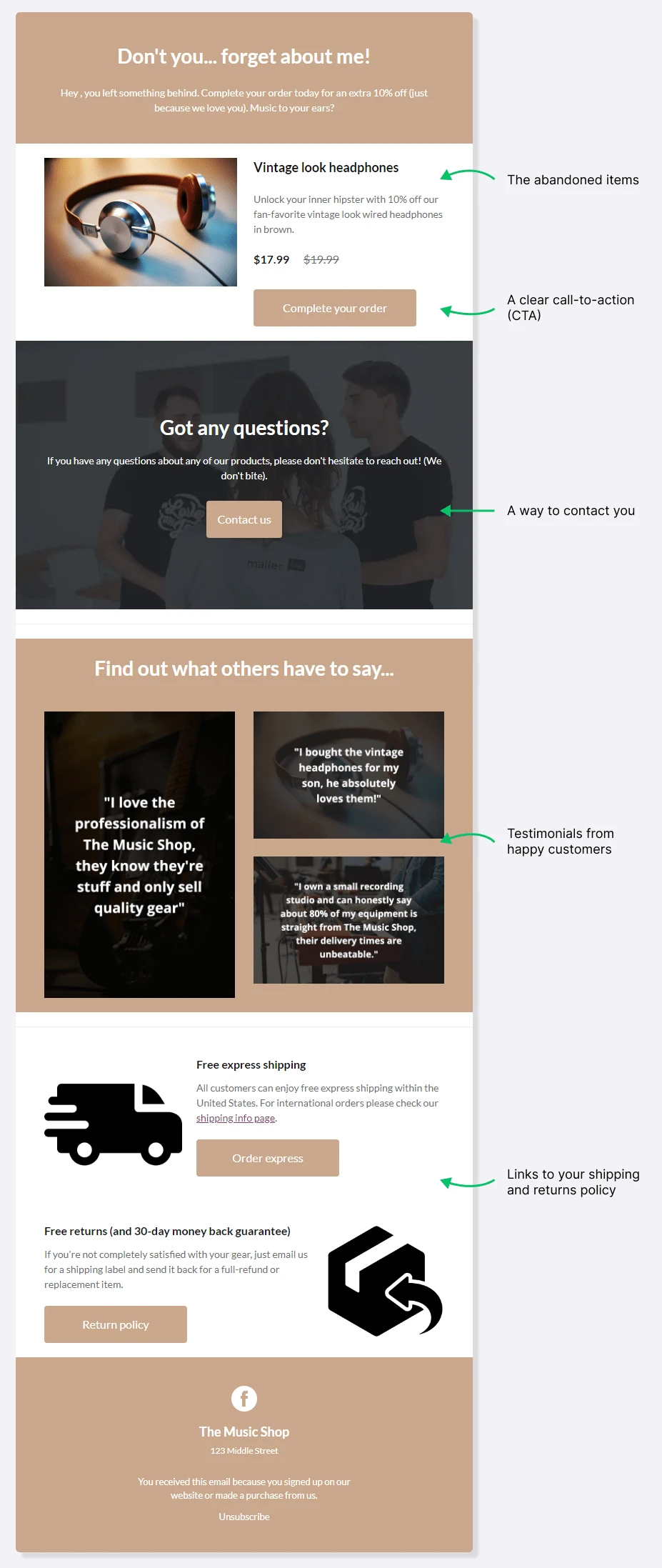
They will typically include some combination of the following 5 elements:
Information about the abandoned item(s)
A clear call-to-action (CTA)
Testimonials from happy customers
Links to your shipping and returns policies
FAQs or customer support contact links
See how these elements can come together in the abandoned cart email template below. All 5 elements are covered in a way that’s easy to read and provides the customer with enough information to complete the sale.
Other abandoned cart email best practices to consider are the timing of your email and optimizing its performance with testing.
Let’s look at each of these factors in further detail.
1. Remind them: Include the abandoned item details
First, bring the product back into focus. Seeing the item right in their inbox acts as a powerful reminder of why they wanted to buy it in the first place.
Be specific: Include a clear image, the product name, price, and any other relevant details like size, color, or quantity.
2. Guide them: Add a clear call-to-action (CTA)
Use a clear CTA button to compel the reader to click through and complete their purchase.
Your CTA should be easy to spot and include actionable instructions. Here are 8 CTA ideas you can use in your messages:
Complete my order
Let’s do this!
View cart
Claim offer now
Get 15% off
Choose free gift
Order now
Take it home
Want to learn how to create a CTA button that works? Check out this guide:

3. Build trust: Offer easy customer support and FAQs
A common reason for abandonment is a solvable question or doubt. Making it effortless for customers to get help is a crucial best practice.
Contact information: Include direct contact information (phone, email) or a contact form link in your email footer
Invite replies: Encourage subscribers to simply reply to the abandoned cart email with any questions
Anticipate doubts with an FAQ: Address common hesitant shopper concerns by adding an FAQ section to your content
FAQ sections could answer questions such as:
“How long does shipping take?”
“How can I return items I don’t want to keep?”
“Is this product made from sustainable materials?”
“Does this product come with a warranty?”
“Is there a cooling-off period to use this service?”
“Can I get a discount for referring a friend?”
4. Provide proof: Testimonials from happy customers
Lack of trust is a frequent cause of cart abandonment. Add testimonials, reviews or social media posts to your cart recovery emails to show potential customers they can trust your brand.
After reading the positive feedback from other real people, the cart abandoners are more likely to follow through with their purchase.
5. Remove friction: Links to your shipping and returns policy
Empower new customers to shop with confidence. bBy including links to your shipping and returns policy in the email, you clarify the costs and ensure the purchase feels risk-free.
6. Master the timing: Send your abandoned cart email at the right time
The best time to send email newsletters depends on your industry, audience and the type of content you send. But when it comes to abandoned cart emails, there is a tried and true, ideal sending time.
Abandoned cart emails should be triggered one hour after cart abandonment.
This leaves enough time to ensure the cart actually has been abandoned (and the shopper isn’t just comparing items from another store in a different tab) but doesn’t leave too much time that the potential buyer no longer wants to make the purchase.
To maximize the chances of abandoned cart recovery, you can also use an abandoned cart email sequence to send follow-up emails in the days after the cart abandonment.
7. Optimize performance: A/B test your workflows
The perfect sequence rarely happens on the first try. Always analyze your automation reports to see where engagement is high or low.
Use A/B testing to try two different versions of your:
Subject line
Send delay time
Incentives (e.g., free shipping vs. 10% off)
Once you have a winner based on open or click rates, implement it across all customers to continuously increase the impact of your recovery efforts.
We asked our legal team to clarify how to send abandoned cart emails legally, specifically regarding GDPR.
They answered that while abandoned cart emails are generally legal, compliance with GDPR entails the need to collect explicit permission or consent from subscribers before sending any form of marketing email, including abandoned cart messages.
If you create your abandoned cart emails with MailerLite, they will only be sent to users who have opted to receive marketing emails.
Want a handy abandoned cart email checklist? We teamed up with Stripo and email marketing experts to create one just for you. Check it out here:
Win back lost sales
Whether you’re a world-renowned e-commerce brand or running a small business from home, cart abandonment happens to everyone.
Cart abandonment emails are the easiest way to recover sales when this happens. Get started by signing up for an email marketing platform, connecting it with your e-commerce store, and creating an abandoned cart marketing automation.
E-commerce stores with under 500 email subscribers can use MailerLite’s free plan to access all they need to send abandoned cart emails without paying a cent.
Larger e-commerce stores can try our paid plans, which start at $9 per month and come with a 14-day free trial you can use to test the software.
Win back lost sales
Sign up for a free MailerLite account to create your very own cart abandonment automation and win back those lost sales!
Abandoned cart email FAQs
1. What to include in an abandoned cart email?
Abandoned cart emails should be kept simple, with all elements focusing on getting the recipient back to the shopping checkout.
We recommend that your abandoned cart email should include:
-Your usual header so people trust the message came from your brand
-A headline that reminds the recipient to make the purchase
-A dynamic product block that automatically populates with an image of the abandoned product and relevant details
-Your usual footer with address and unsubscribe links
You may also want to include more content that encourages the recipient to buy. For example, you could add information about your delivery and returns policy or customer reviews and testimonials.
2. When should you send an abandoned cart email?
Send the first email an hour after the cart is abandoned. This gives the buyer enough time to finish the purchase if they want to, while ensuring they receive the email while the buying decision is fresh in their mind. You can then follow up the next day, and even send a final reminder another day or two later.
3. How many abandoned cart emails should you send?
Send between one and three emails. One is often enough, and limiting your sequence to a single email ensures you don’t overwhelm the customer.
Sending two to three emails gives the recipient more chances to see the message and, ultimately, make a purchase. You can also use conditions to only send the second or third email if someone doesn’t open the first one. This ensures that only people who missed the first message receive the second one.
4. Do you need consent to send abandoned cart emails?
Yes. In much of the world, you need consent to send marketing emails, and an abandoned cart message is no different from any other marketing email. MailerLite only sends recovery emails to opted-in subscribers, which helps keep your sending compliant.
5. Do guest checkouts trigger abandoned cart emails?
The abandoned cart trigger only works for logged-in, opted-in shoppers, because guest carts have no email attached yet. Once a guest enters their email at checkout, they can enter the abandoned checkout flow instead.
6. Are abandoned cart emails worth it?
Yes. Because recipients already showed buying intent, recovery emails convert well. And since they are so easy to set up and run, we really believe that all stores can benefit from them.
Add MailerLite as a preferred source on Google. It tells Google you trust us, so you'll see more of our content in Top Stories and AI Overviews.
Add as a preferred source