Inbox AI is (kinda) here: Here's what it means for your email marketing

 Kasturi and Jess, marketing team.
We’ve spoken a lot about how you can use AI to improve your email marketing campaigns. But there’s another side to the AI in email marketing story: How AI impacts how people use their inboxes.
Two big changes could affect how people interact with emails. These are AI features being added to inboxes like Gmail and people using AI agents to access their inboxes.
Below, we'll cut through the noise, explain what's actually changing, and share a few simple ways to help your emails get noticed.
TL;DR: Email inbox AI tools breakdown
AI inbox features allow people to browse their inbox and act on emails without opening them
These tools currently have low adoption rates, but this may increase over time as rollouts expand and people get used to AI
The way these tools parse information could result in changes to your email metrics
Including essential information in your subject line and at the top of your email can help AI tools understand your message
What exactly is inbox AI?
Inbox AI tools let people interact with their inbox using AI, typically through a chat interface or automated summaries.
Each tool works in a different way, but they all allow people to perform tasks like summarizing their recent emails, searching for information, and responding to messages without navigating the emails in their inbox.
Gmail’s Inbox AI is the tool most people are talking about. Because over 3 billion people use Gmail, any changes to the platform will impact almost every email marketer. But other inbox providers, including Apple Mail, Yahoo and Outlook, as well as AI-native inboxes like Superhuman, offer AI features.
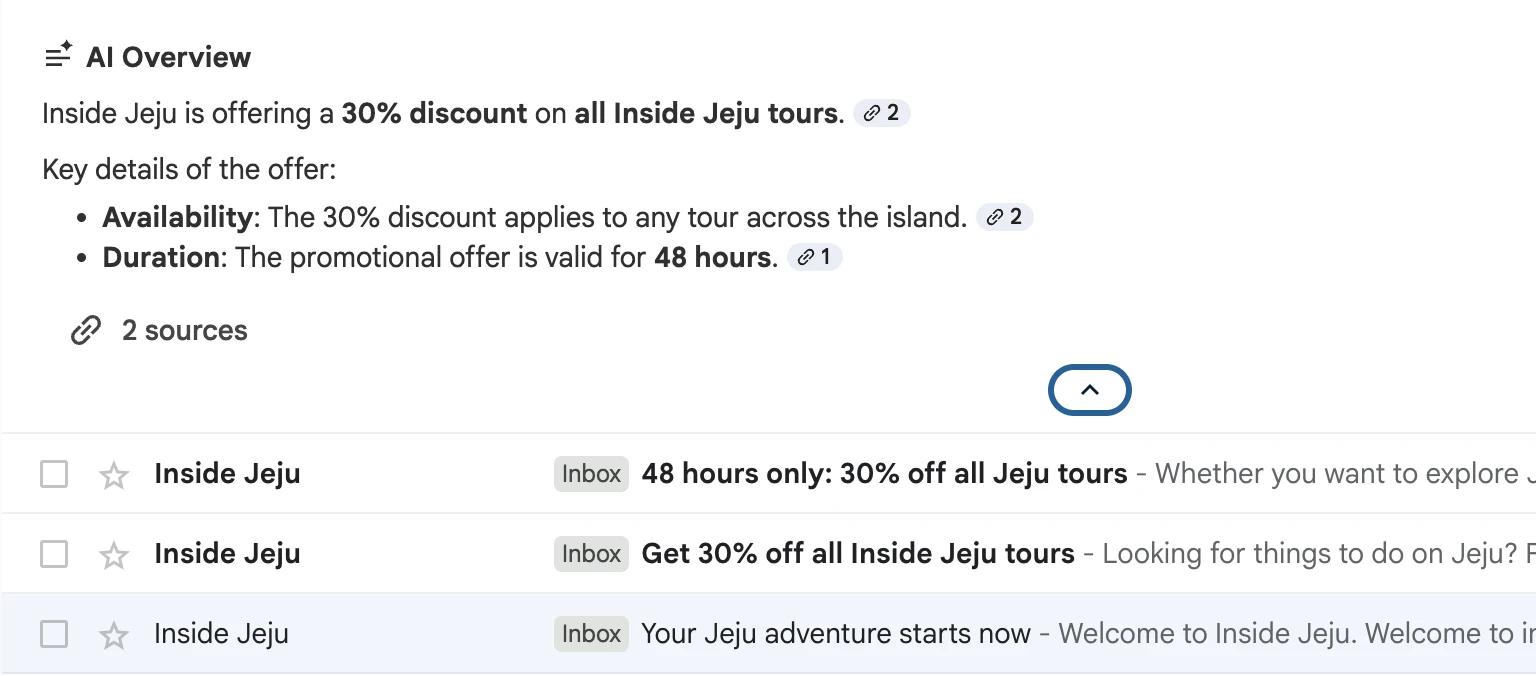
AI apps and agents like Claude, ChatGPT, or Meta’s new Muse app could also impact how people interact with their emails. Each of these tools lets people connect their email accounts, navigate their messages, and take actions without ever opening their inbox.
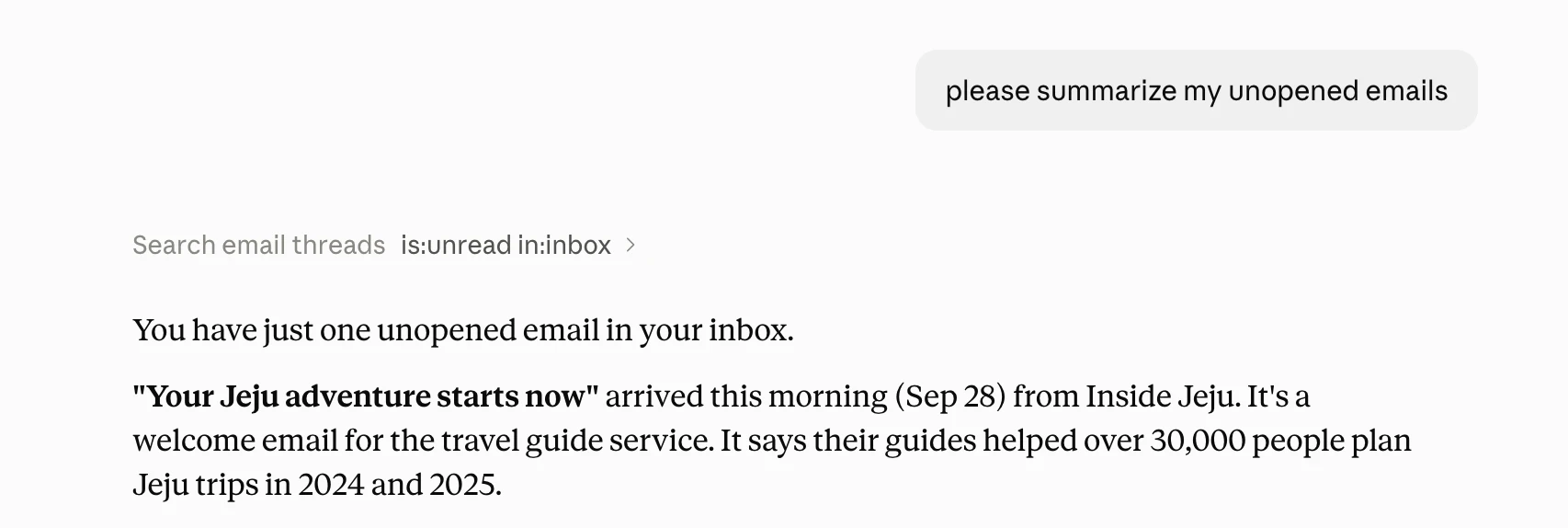
If you’re worried that people using AI to navigate their inboxes means they won’t read your messages, take a deep breath. That’s not what we're seeing. AI is just giving people a different way to access the information in their inbox.
The caveat: most people aren’t using these tools yet
We estimate that very few people are using these tools. Google started rolling its AI features out to paid Gmail users in the U.S. at the start of the year, and on September 3, 2026, it began expanding AI Overviews in Gmail search globally.
Even then, the feature is only available to accounts with English as their Gmail language and isn’t available for personal accounts in the EEA, UK, Switzerland, or Japan.
Because of these limitations, the people using them are still a tiny slice of Gmail’s billions of users.
As for how many people are letting Claude or ChatGPT run their inbox, we can't say for sure. Our hunch is that it's still a pretty small crowd.
That’s because our email data shows no significant changes to email engagement in the months since these tools were released. As we’ll discuss in the next section, if a significant percentage of email users were using the tools, we’d expect to see it in the metrics.
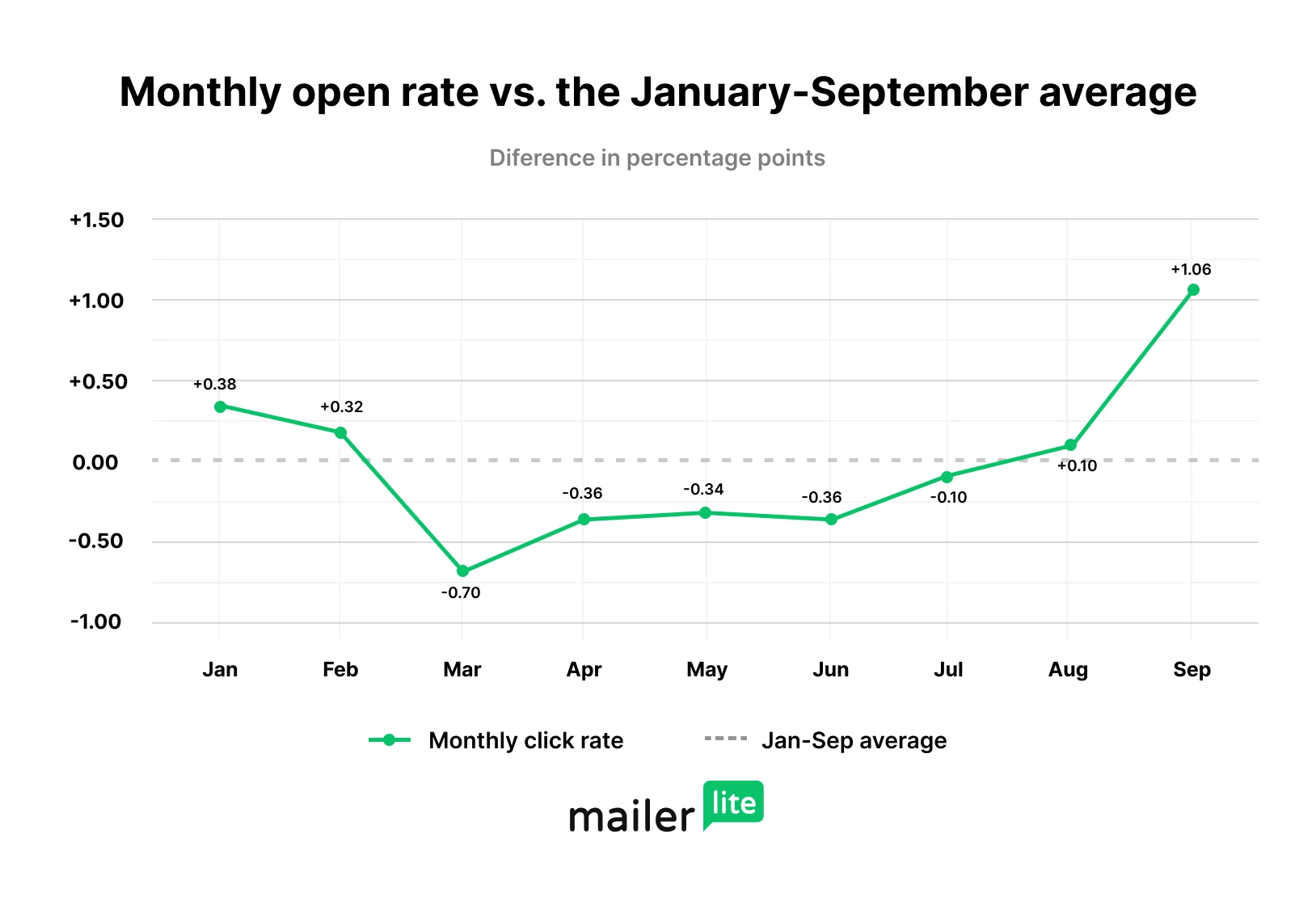
Of course, this doesn't mean that changes won’t come later. If the paid features expand to free users and people become more familiar with the tools, we may see a bigger impact.
How do AI inbox tools impact email marketing metrics?
If more people use these AI inbox tools, email marketing metrics like opens and clicks will become less reliable.
That’s not because people will stop seeing your emails; it’s because of a mismatch between how AI agents access your email content and how marketing tools track engagement.
For example, email marketing tools like MailerLite include a beacon in your email that loads when the email is opened. When the beacon loads, the software marks the email as opened, and this is reflected in your dashboard.
But when AI tools access the email content, they don’t load this beacon. Anyone who uses AI tools to read your emails may not be marked as having read the email, even if they gained all the information from it.
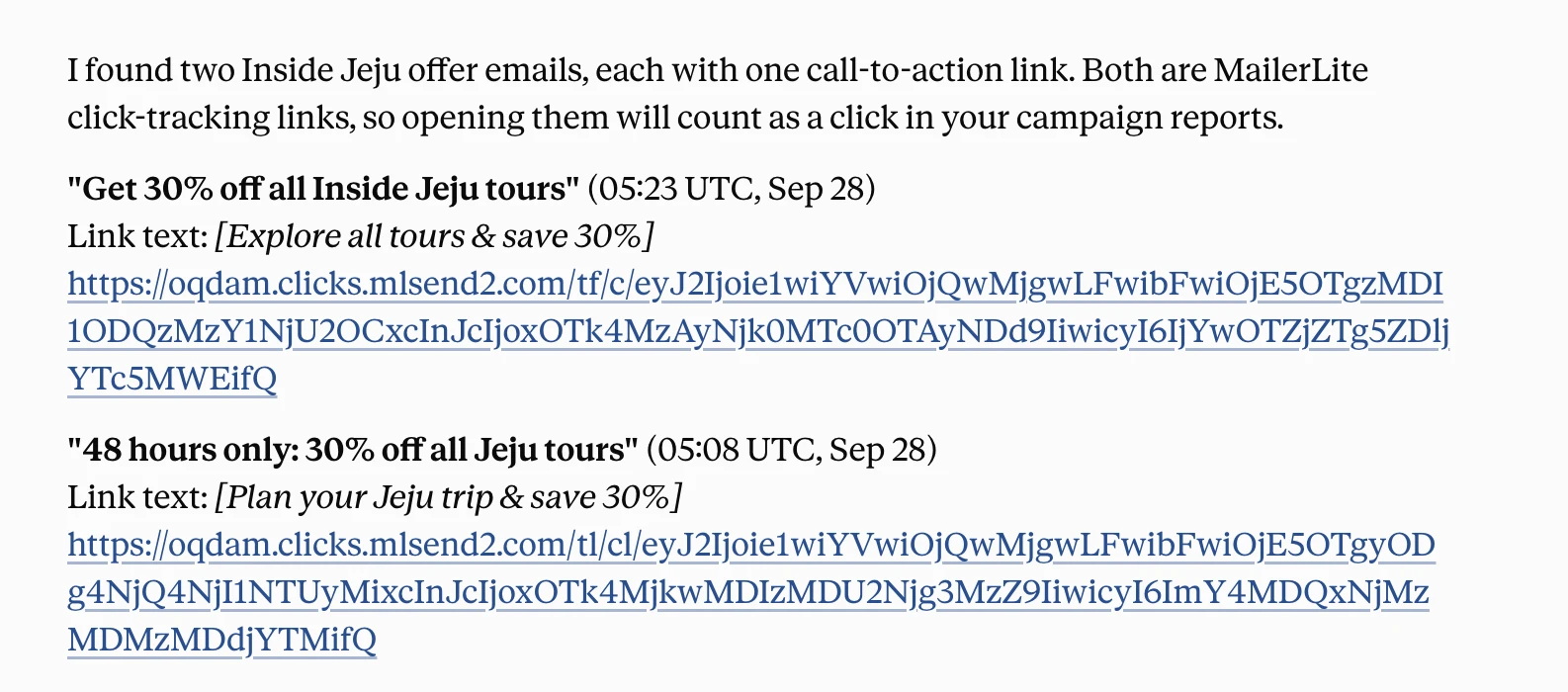
The impact on clicks is more uncertain, but still likely to result in changes. Email tools track clicks by redirecting the subscriber via a URL they control. When the subscriber clicks a link, they first pass through this tracking URL, which logs the click and then instantly forwards them to the destination page.
When presenting links, both Claude and Gmail return the link with the redirect; clicking on this would still register as a click in MailerLite.
But if the AI navigates through the link to discover more about the page, no click will be registered. Likewise, fewer people may click on a link if it isn’t right there in front of them.
How to make sure your emails still get seen
Quick reminder before we dive in: most people still read their emails the old-fashioned way. If your strategy is working, don't tear it up. Think of the tips below as a bonus that may help your emails be more visible in inboxes that use AI. Handily, the tips can help you optimize your emails for humans too.
Front-load the most important information
Not all AI tools work in exactly the same way. But we can get a good understanding of how they work, and therefore how to stand out, by looking at the method Claude uses to analyze your inbox.
When Claude searches a Gmail inbox, it typically sees each email’s sender, subject line, and a short preview of the opening text, then uses this information to create the summary you see.
That means front-loading your most important information in the subject line and opening lines helps AI tools understand your message and include it in their summaries.
Email 1 has the subject line “Get 50% off our fall collection” and the first 200 characters are “Hey, our fall sale is now open! We’re offering up to 50% off all items in our fall/winter 2026 collection starting today. But be quick, the sale ends on October 6. Check out the sale at ourwebsite.com”
Email 2 has the subject line “Something special is here!” and the first 200 characters are “Hey friend! The hot summer days are almost over. That means just one thing: it's the season to start planning your fall wardrobe. And we’re here to make your job just that little bit easier.”
Email 1 makes all the important information readily available for the AI tool, so it can create a summary with all the relevant details.
Email 2 doesn't mention the sale early on, so the AI tool probably won't include it in the summary.
Make your emails feel important
Inbox AI works a bit like a very efficient personal assistant; its job is deciding what's worth its boss's time. As the person sending the email, your job is to make that decision easy.
With that in mind, including information in the subject line and first 200 characters that makes your message feel essential could increase its visibility.
This could mean highlighting when:
An offer has a limited time period
The recipient has to take action
The email includes something the recipient requested
The email includes critical information about an event or appointment
It could also mean framing the email in a way that feels more actionable. For example, a welcome email with the angle of “Here’s your discount code” may perform better than one with the angle of “Thanks for signing up.”
The point isn’t to artificially inflate the importance of the email. Instead, the idea is to clearly highlight why the email matters to the recipient.
Personalization could matter more than ever
Email marketers can use personalization to make each email more relevant to each recipient. When we say personalization, we’re not just talking about adding someone's name to an email. We mean tailoring the entire journey to the recipient.
This could mean:
Using segments to provide targeted offers
Using automation to send important content at the time it’s needed
Including dynamic content that is relevant to the recipient
These are all strategies that can help you send important emails that AI may be more likely to include in inbox summaries.
Use a single goal for each email
It’s long been good practice for email marketers to give each message a single main goal. This could be introducing a new collection, promoting a sale, or sharing a piece of content.
This is the same in the world of AI. Having one goal in the email makes it easier for the tool to understand what your email is about while allowing you to include this information in the subject line and first 200 characters.
That doesn’t mean you can’t include extra content in your emails. Just be prepared that anything that isn’t part of the main goal may be missed in the summary.
Deliverability still matters (a lot)
The email still needs to land in the inbox to be seen by the AI. This means all the standard email deliverability tips will be as important as ever.
For example:
Set up your SPF, DKIM and DMARC records
Only add people to your list who opt in and want to hear from you
Use a reliable email sending partner
These tips increase the chances of your message hitting the inbox, which will in turn give the AI tools the best chance of seeing it.
Look beyond opens and clicks to track campaigns
If open and click rates become less reliable, you’ll still be able to track the impact of your campaigns through related metrics, such as sales, page views, or calls booked. If you send an email and get a jump in sales, the email would likely have contributed to this number.
Email will still be an effective way to reach your audience
Even if these tools take off and people start viewing your email content without visiting the inbox directly, email is still going to be the best way to get information in front of people at little cost.
You’ll just need to make sure that your emails are formatted in a way that makes it easy for AI tools to surface this information, while ensuring you provide a positive experience for people who do click through to your email.
Remember that, unlike most other forms of marketing, email is something people actively choose to receive. They want to learn about your products, offers, and content. Email is and will remain an effective way to provide this information.