Ebook marketing: How to promote and sell your ebook (2026 guide)

 Davy, Martin, and Carolina, Finance team.
Selling ebooks is one of the most reliable ways to turn expertise into revenue. But writing a great book is only half the job. You need a solid ebook marketing strategy to get people to actually read it.
Whether you're a small business using an ebook as a lead magnet or an independent author selling your ebook as a standalone product, you need a solid strategy that covers the weeks before launch, the launch itself, and the months after, when most of the actual sales tend to happen
This guide walks through a complete ebook marketing framework: from how to build hype before you publish to how to measure whether your marketing strategy is working. Let's get into it.
What is ebook marketing?
Ebook marketing is the process of promoting a digital book, whether the aim is to sell it, gain a bigger audience, or generate leads for your business. You can sell the ebook itself as a paid product, or give it away as a lead magnet to collect emails and build trust. Most tactics in this guide work for both kinds of ebooks.
Whatever your goal, ebook marketing requires:
A place to sell or distribute the ebook
A way to build an audience for the ebook
A plan for sustaining sales after the initial launch
How to build an ebook marketing strategy
There are 3 phases to a successful ebook marketing strategy. Skip one and the rest of your launch will fall like dominoes. Those phases are:
Pre-launch
Launch
Evergreen
Let’s look at each of these phases and how to nail them.
Note: Before you start building the strategy, get clear on who you're writing for. Sketch out your ideal reader: their goals, the problem they're stuck on, and where they already spend time online, i.e., social platforms, forums, newsletters. This shapes everything downstream, from your landing page copy to which channels you should show up on.
Phase 1: Build the audience before the book exists (pre-launch)
The pre-launch phase is your opportunity to build hype and anticipation around your ebook and get your target audience excited to dive into its juicy contents.
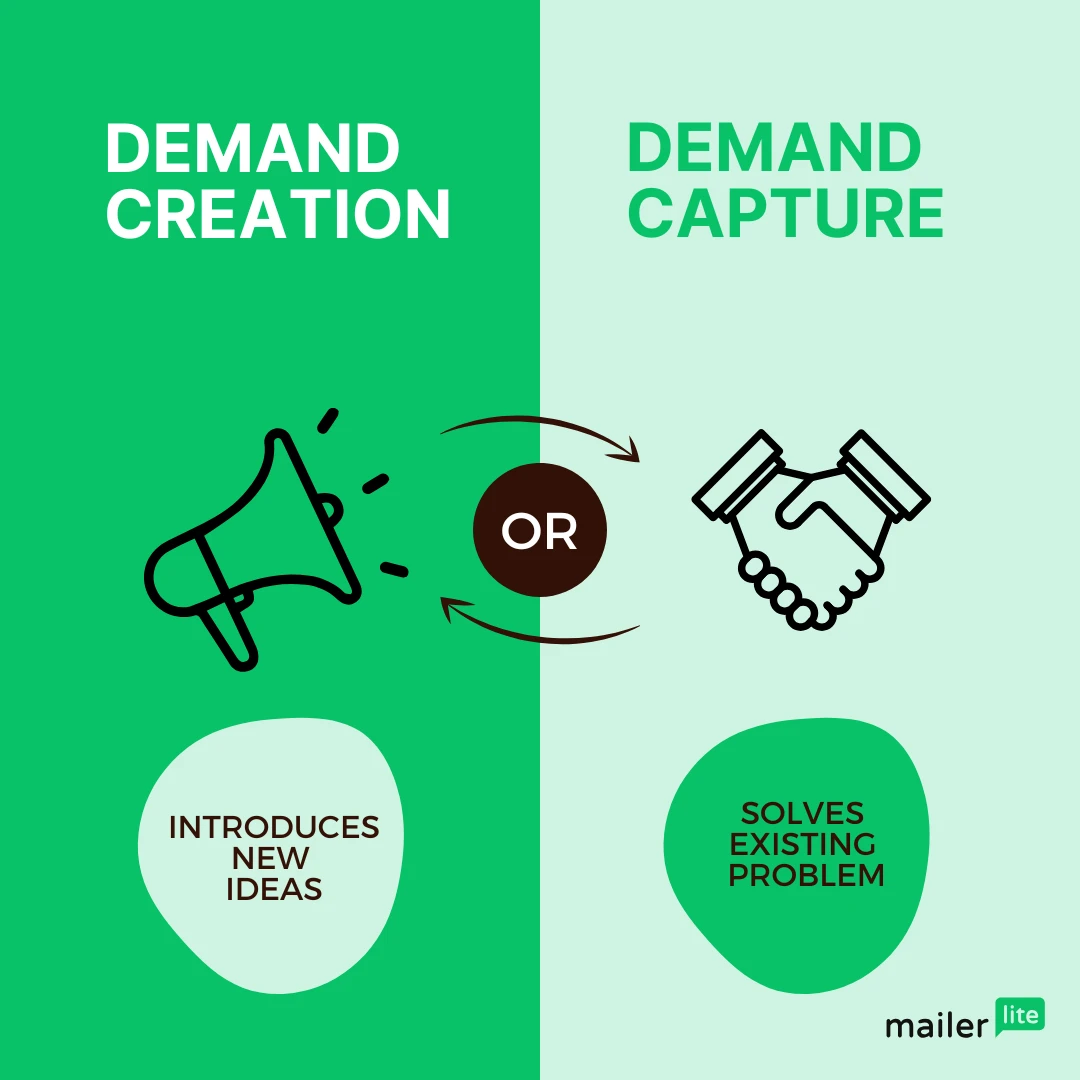
Decide if your ebook is “demand creation” or “demand capture”
Is your book introducing a new idea or solving an existing problem people are already searching for?
If it’s introducing a new idea then your ebook is in the demand creation category. If people are already aware of the topic and searching for it, then it's in the demand capture category.
Knowing this is important because it can affect how you approach your content marketing strategy, especially during the pre-launch phase. Professional ebook writer, Annie Obergefell, expands on this.

Demand creation is more like thought leadership, talking about the problem and why it matters. Demand capture is when you’re capitalizing on a topic that people already know and care about so you can spend less time helping your audience understand why the problem matters and more time diving into how to solve it.
Demand creation
If your ebook is in the demand creation category then part of your job is giving a name to the struggles your audience is going through.
For example, picture an HR platform that named a pattern "quiet churn," that is, employees mentally checking out long before they formally resign. Once a common problem has a name, you don't have to convince anyone it exists. You just have to be the one who described it first.
Your content should also give a name to your audience’s pain points, introduce the solution to overcome them, and show how your upcoming book dives deeper into this topic.
Given that you’re creating awareness about a problem, you can focus less on producing search engine optimized (SEO) blog posts and focus more heavily on social media, speaking engagements, and podcast interviews to spread your message. This is because there won’t be many people searching for the topic as you're creating demand for it.
Demand capture
If your ebook focuses on capturing demand for an already established topic, then you can focus more on differentiating your unique take on the topic. Why should people trust and listen to what you have to say compared to what everyone else is already saying about it? Once you’ve got the answer to that question you’ll find that your pre-launch content writes itself!
Demand capture content also lends itself very well to creating SEO-optimized blogs or YouTube videos as people are actively searching for information on the topic.
Now to prepare for your pre-launch phase, we recommend doing the following:
Build a landing page for your ebook
Build your email list with a lead magnet
Generate hype on social media
Give away some copies of your ebook strategically in exchange for reviews
Let’s expand on each of these.
Build a landing page for your ebook
A landing page is a webpage that’s dedicated to one offer, in this case, your ebook. You want it to be as focused as possible on that one thing which means you don’t want to include a navigation bar to other pages or include calls-to-action (CTAs) that aren’t related to your ebook. It can be daunting to write one though, even if you’ve just written an entire ebook!
To help you overcome the blank page, here’s what your landing page should include.
Anatomy of a great ebook landing page
A great landing page should include the following:
A clean design
An enticing hero section
Reviews from readers
A blurb about the book
An “about the author” section
An email sign-up form
Here’s how to nail each of these elements.
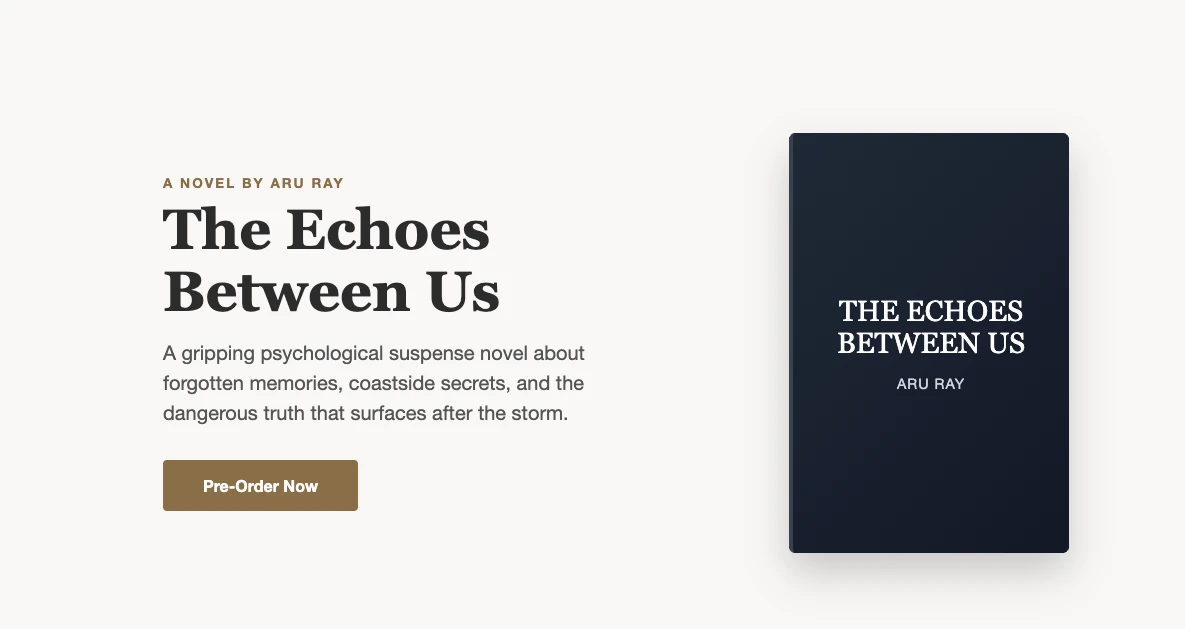
Hero section
The hero section is the first part of your page that’s visible when someone visits. It should include:
The name of your ebook as a headline
A short, enticing description of your ebook
A photo of the cover
A CTA button (buy, pre-order, or download a sample)
Reviews
Ideally, you want to have some reviews to share before the ebook has been officially released. We’ll dive into how to do this strategically below.
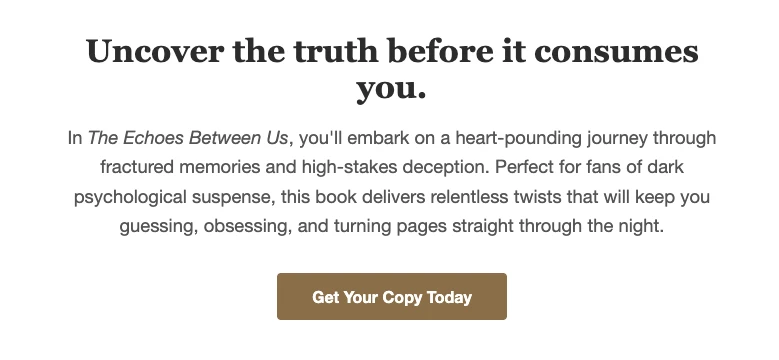
A blurb
A short description of your ebook that really sells the value someone will get by reading it.
About the author
Add a photo and a short paragraph about yourself. The goal here is to help someone understand why you’re a trusted expert in this topic. To boost your credibility and authority you can add:
Awards you’ve won
How many years you’ve been working in your field
Previous publications
Any media appearances
You don’t have to include all of these, but if you have some of them, add them to your About section.
Effortlessly build your ebook’s landing page
With stunning templates and an intuitive Drag and drop builder, you’ll soon build a landing page you can be proud to send people to.
Grow and nurture an email list
An email list gives you a direct line of communication with your audience away from the fickle nature of algorithms.
There are a ton of ways to build your email list, but for an ebook, the easiest way to build a list of engaged potential readers is to give away a free chapter of your book. This strategy is known as a lead magnet.
Doing this during the pre-launch phase is crucial because once your ebook comes out, you’ll have a list of eager beavers who are already excited about your release!

Link to your landing page everywhere to drive traffic to your sign-up form. For example, if you are giving podcast interviews as part of your promotion strategy, ask the host to link out to your landing page so their listeners can download the first chapter for free.
Join thousands of authors who trust MailerLite
Use MailerLite to deliver free chapters of your eBook, build automations to secure reviews and sales, and integrate us with author-specific platforms like BookFunnel.
Generate hype on social media
Your social media platforms are a great place to give your followers some sneak peeks into your book to boost interest. Here are some posts and campaigns you can create to generate hype during the pre-launch phase:
Create quote graphics from key insights from the book
Release the cover image of the book
Announce the official release date so readers could start the countdown to launch day
Share reels and short videos around the book’s plot points or your author journey
Organize a giveaway where your followers share promotion posts to win a free copy of the printed book
And don’t forget to engage!
Give away copies strategically for reviews
Before your ebook launches, you want to already have some reviews to help sell it. One great strategy is to give the ebook away ahead of the launch to influencers your audience will recognize.
You can also run a giveaway and ask winners to share their reviews on Amazon and Goodreads.
Finally, you can use platforms like Story Origin or BookFunnel to give away review copies of your ebook and even sync up your audiences there with your email list on MailerLite!
Phase 2: Launch day promotion and early sales
It’s officially launch day, so fill up your coffee cup, get the confetti ready, and watch the sales pour in with these launch day strategies.
Go live and host a Q&A
Boost your visibility across your social media channels by going live. When you go live most platforms will send a notification to your followers, helping drive more attendees.
Here are some talking points when you go live:
What didn’t make it into your book: Are there any strategies or stories you wanted to include but couldn’t? Talk about them now!
Field questions from your followers with a Q&A session
Share your top 3 insights from the book
Thank everyone who was involved in helping bring it to life
Tell your followers what top lessons writing, editing, and publishing an ebook has taught you
Post across platforms that the day has come!
Remember to let people know:
Where they can buy your ebook
How much it costs
If there’s a special launch discount (and when it ends)
As you’ve been a smart cookie and built your email list during the pre-launch phase, let your email list know with a special launch announcement newsletter.
Want to boost your open rates? Use our automatic resend feature to resend the launch email to subscribers who didn’t open your email the first time around. This feature has helped one of our customers see a 45% boost in open rates.
Consider an introductory discount to boost sales
You can have a special discount that runs for the first 24 or 48 hours of your ebook’s release. Keeping the timeframe short and sweet will help ensure more sales.
Add a banner on your site
Add an announcement banner to your site so visitors know about your new ebook and link to your ebook’s landing page so they can learn more about it.

Add a promotional pop-up
A well-timed and respectful pop-up will drive more potential readers to your ebook’s landing page. Make sure you add a delay so it doesn’t appear the second someone lands on your site as this can cause a frustrating user experience. You can choose to show your pop-up when someone has been on your page for a certain amount of time (e.g. 20 seconds) or when they scroll to a certain depth on a page (e.g. 25%).
With MailerLite you can also add a countdown timer to your pop-up to highlight when your launch offer discount is ending to add a bit of urgency.
Phase 3: Evergreen ebook promotion tactics
Once the excitement of the official launch has died down, how do you keep momentum going? Here are some strategies that you can leverage to keep up your ebook sales long after its launch.
Get your ebook ranking on Amazon
We caught up with our SEO content specialist, Veronika, to get her wisdom on how to shoot an ebook to the top of Amazon’s Kindle rankings. Here’s what she shared:
The most important ranking factors are purchases and reviews, those need to come in fast after the launch which is why a good pre-launch strategy is so important.
Next, she used an app called Publisher Rocket to help her optimize the ebook for Amazon’s search engine.
Publisher Rocket helps optimize your ebook listing by:
Diving deep into Amazon’s 19,000+ categories to find the perfect fit for your book to maximize sales potential
Uncovering high-performing Amazon keywords to optimize your book listings
Giving you insights into how similar authors are optimizing their own books for improved search results
Using the data and insights from Publisher Rocket alongside a great strategy to gather reviews can help you get those coveted #1 Bestseller bragging rights.
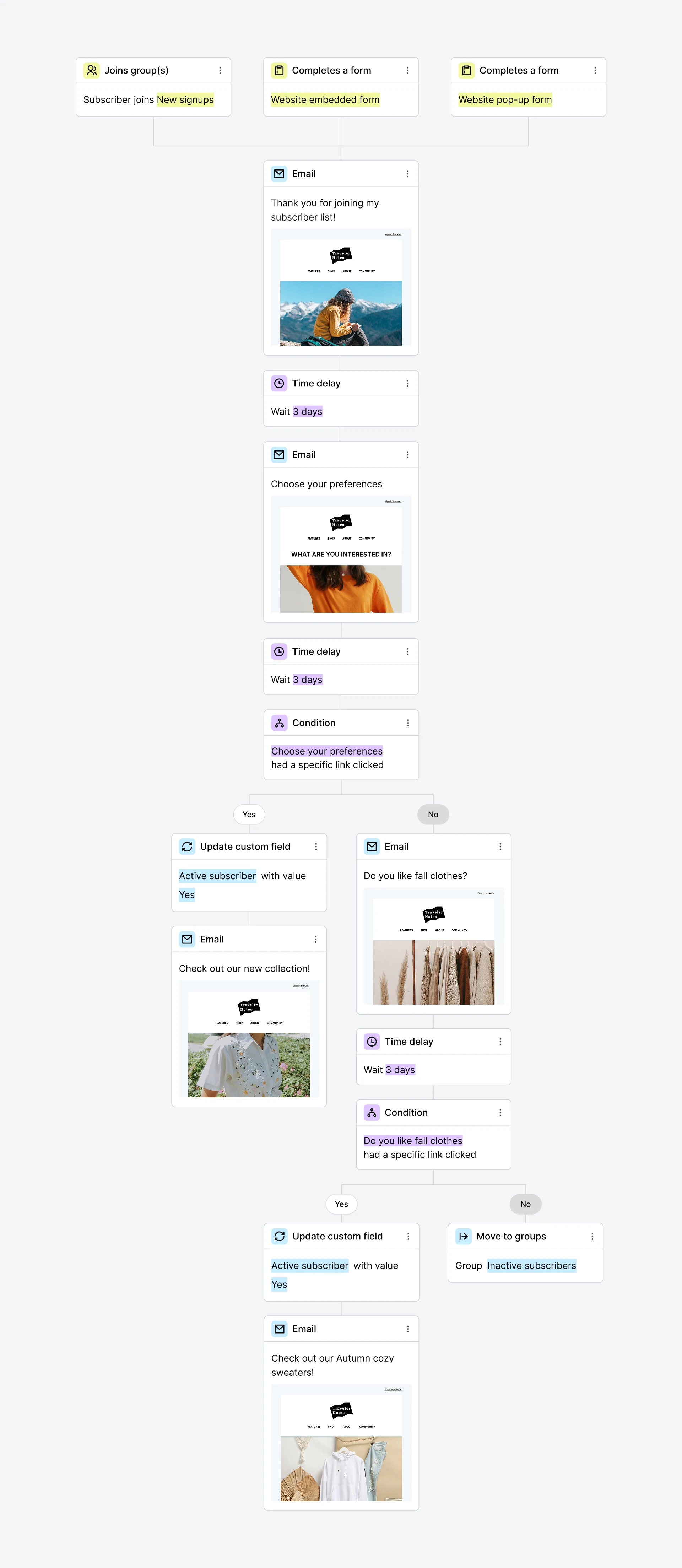
Build a post-sign-up email automation
Did someone new join your mailing list? Did a subscriber take you up on that offer of a free chapter? This isn’t just a good moment to promote your ebook. This is the moment to do it. Their interest is at its peak and you need to capitalize on it.
Automations can sound a little scary, but with the right tech, they’re super easy to set up. Just choose a trigger, like joining a group, and then use our Drag and drop builder to add the emails you want to send while adding a time delay between each one.
Say, you've written Focused by Design, a nonfiction ebook on building better habits at work. Here’s how your nurture sequence might look like:
Welcome email giving the subscriber the free chapter they asked for (Day 1).
Share the "two-minute rule," a core concept from the book for making new habits easier to start (Day 2).
Share a framework, the 3-part weekly review system explored in more detail in the book (Day 3).
Talk about a common mistake people make when trying to build habits, and how the book's approach avoids it (Day 4).
Explore a related challenge, like staying consistent while working remotely, with a few practical tips (Day 5).
Final email with a call-to-action to read the book to dig deeper into all the ideas you've shared over the past few days (Day 6).
Don't be afraid of sending too many emails. This type of cadence for the first week isn't too much. They've specifically asked to hear from you, and this is when they're most receptive to your emails. So take advantage of having their attention!
Segment your list once it grows
Not every subscriber is at the same stage; some just signed up, some have been on your list for months, some have already bought. Sending the same email to all of them leaves engagement on the table.
No-code course creator Gregory John of Buildcamp segments his list by signup date, purchase history, and activity level, then sends targeted content to each group.
The difference is stark. His most engaged segment sees an 86.26% open rate and 7% click-through, compared to 39.16% open rate when he sends to his full list.
Even a simple split, such as, customers vs. non-customers, or active vs. inactive, is usually enough to see a meaningful lift.
You can remove subscribers from the sequence once they've purchased the ebook, or add them to an automation that asks for a review.
Share reviews and testimonials
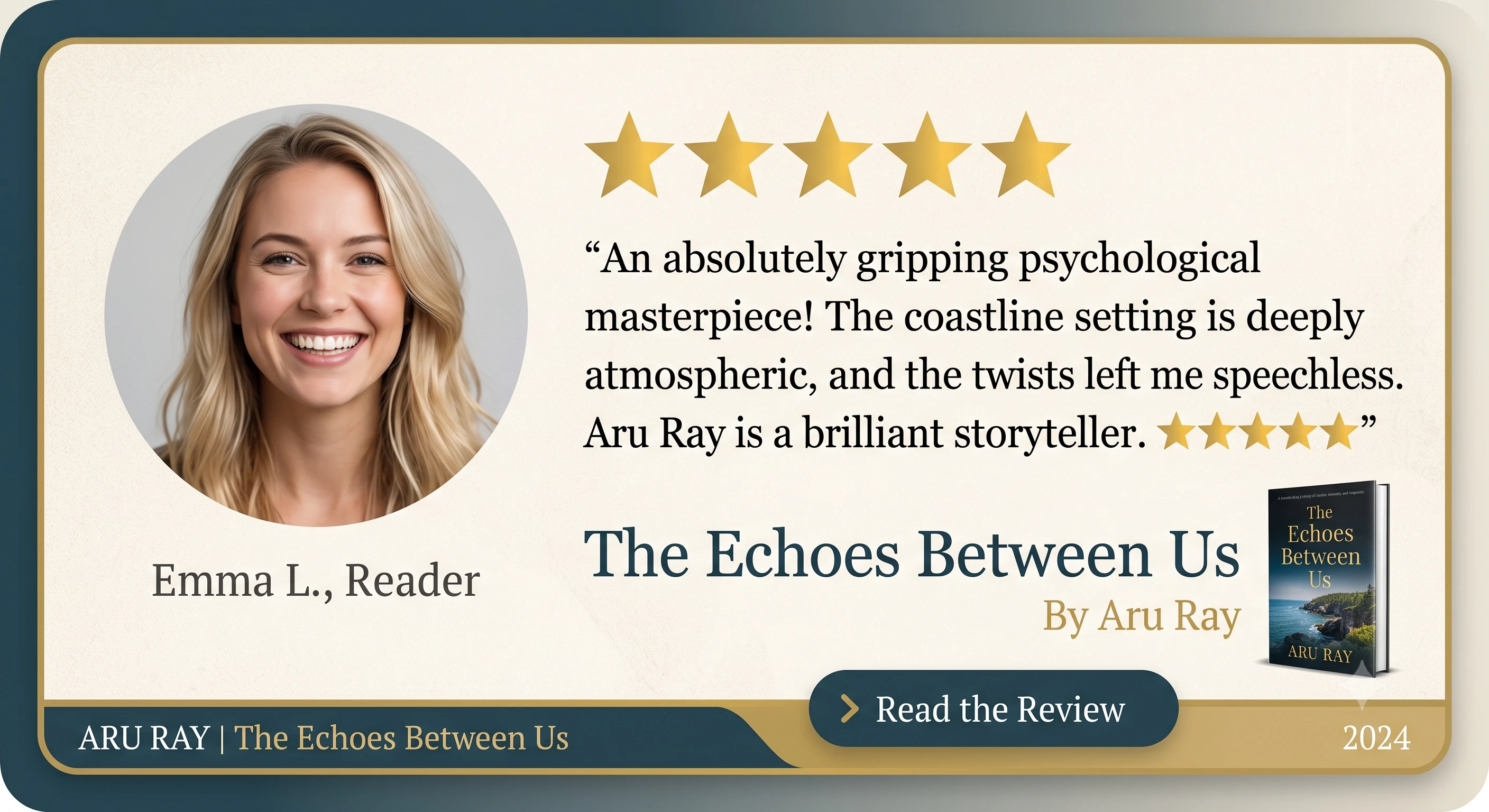
Continuously sharing reviews of your book on social media is a great way to remind people of how others are enjoying your book. You can also add a recent review to your regular newsletter using one of our social proof blocks.
Create infographics and share them
Create infographics summarizing key ideas from your book and share these on social media and in your newsletter. You can create these on Canva or napkin.ai. Napkin.ai is a nifty tool if you’re not especially visual because you can feed it some of your text and it will automatically generate a nice visual to summarize your points.
Find your niche community
Find relevant communities where you can engage with your ideal reader. Reddit has some of the liveliest, most engaged, and passionate niche communities out there and there is a subreddit for everything. Just always make sure to read the guidelines about any type of self-promotion.
Say you've written a nonfiction ebook on personal finance for freelancers. You could join communities like r/freelance, r/personalfinance, and r/smallbusiness, plus genre-specific spaces like r/digitalnomad if your book touches on location-independent work.
Appear on relevant podcasts
Appearing on the right podcasts will expose you to more of your ideal readers while boosting your authority on the topic you’ve written about.
Here’s how to send a brilliant pitch that’ll get hosts interested:
Research the podcast & host: Listen to the podcast and if you like what you hear then consider pitching
Build on & enrich past episodes: If a past episode covered a topic you’d like to discuss, tell the host how your interview can build upon that content
Give an outline of 2-4 talking points
Offer to include something for listeners like a free chapter of your ebook or an exclusive discount for them
Add your ebook to your email signature
This simple strategy means that every single time you send an email more people are hearing about your ebook. Add it to your regular email signature and the email signature you use in your newsletters. In MailerLite you can create a custom email signature block and reuse it again and again.
With these tips, you’ll make sure your ebook still rakes in sales even after the hype has long died down.
Decide whether your ebook creates demand or captures it
Build a dedicated, distraction-free landing page
Launch a substantial lead magnet to grow your email list
Build pre-launch hype on social media and secure early reviews
Announce launch day across every channel, with a limited-time discount
Use site banners and pop-ups to drive landing page traffic
Set up a post-signup nurture automation
Optimize for Amazon (or your chosen retailer) using keyword and category research
Repurpose content into infographics, podcast appearances, and community discussions
Test paid ads once organic tactics are converting
Track your key metrics and adjust based on what's actually converting
Tools to power your ebook marketing
We’ve talked about some of these features above, but here’s a list of features that could help you as an author building your list on MailerLite:
Landing pages: A dedicated, distraction-free page to send every reader or follower to
Selling digital products: Handles the transaction if you're selling the ebook directly, not just using it as a lead magnet
Signup forms and pop-ups: Capture leads on your landing page, timed by delay or scroll depth if you need to
Email automation: Runs your welcome or nurture sequence on autopilot
A/B testing: Fine-tunes your subject lines, email content, and automations by testing different versions
MCP server: Connects your MailerLite account to an AI tool like Claude, ChatGPT, or Gemini, so you can draft and repurpose content for emails and social platforms, or ask plain-language questions about your campaigns and get answers without digging through a dashboard
Integrations for authors: MailerLite integrates with tools such as Bookfunnel and StoryOrigin for distributing ebooks or lead magnets, finding reviewers, and more.
Ebook ads and paid advertising
Free tactics build the foundation of your ebook marketing, but paid ads can accelerate reach once you know what's converting organically. Here are some strategies for paid advertising of your ebook:
Retarget before you go cold
Don't start with strangers. Build a retargeting audience of people who've already visited your landing page or opened your emails but haven't downloaded or bought yet, then run ads specifically to them. Warm audiences like this tend to convert at a much higher rate than cold traffic, since you're not introducing the offer for the first time, you're reminding someone who was already close.
Build a lookalike audience once you have data
If you have an existing list of subscribers or buyers, both Meta and Amazon let you upload that audience and target people who share similar characteristics. This tends to outperform broad interest-based targeting because it's built on people who've already shown real interest in your book.
Use the ebook as an entry point if you run a business
If you're a service business or agency, a free ebook can work as a qualifying step in a sales funnel: it attracts the right kind of lead, and the follow-up sequence moves them toward a call or consultation rather than a purchase.
Test small, then commit to the platform that's actually converting
Split a modest budget across two platforms for a couple of weeks before scaling either one. Cost per click varies a lot by platform, so use it as a filter, not the whole decision:
Amazon ads run on a pay-per-click model, averaging $0.80 to $1.30 per click. This is best suited to Kindle and Kindle Direct Publishing (KDP) titles, since they capture existing buyer intent
Meta ads (Facebook and Instagram) are priced by cost per thousand impressions (CPM) on an average at $11 to $12, or cost per click (CPC) at $0.60 to $1.20. Meta platforms are best for testing cold and lookalike audiences
BookBub ads are priced by genre. On an average, cost per click varies from $0.30 to $2.00, with strong genre and author targeting. A monthly budget of around $100 gives the algorithm enough data to optimize.
Whichever platform you choose, track cost-per-sale rather than just clicks, and only scale campaigns that stay profitable at your price point.
Measuring the success of your ebook promotion
You won't know what's working without tracking it. Here are the metrics that matter most:
Landing page conversion rate
This is the share of visitors who sign up or buy, divided by total visitors. Benchmarks vary by industry and offer type, so it's worth looking up current gated-content conversion rates for your niche. If your page is falling well short of that benchmark, the copy or offer likely needs work before you spend more on driving traffic to it.
Email open and click-through rates
These your clearest signal for whether subject lines and content are landing. Rather than eyeballing these numbers manually, MailerLite's MCP server lets you connect your account to an AI tool like Claude and ask plain-language questions, such as which subject line drove the most clicks this month, or how your nurture sequence compares to your regular newsletter, and get a direct answer instead of digging through a dashboard.
Review velocity
This measures how quickly reviews come in after launch, since early reviews are also what most retailer algorithms reward. A steady stream early on tends to matter more than a large total that trickles in over months.
Paid ad click-through rate and cost-per-sale
These two matter together because not just about how many people click, but whether those clicks are converting at a price that keeps the campaign profitable. Watch cost-per-sale specifically, since a high click-through rate can still lose money if conversions don't follow.
Check these numbers regularly rather than only after launch. If automation emails are underperforming, that's your cue to A/B test new subject lines or revisit who you're targeting.
Ebook marketing succeeds through a repeatable 3-phase cycle: pre-launch, launch, evergreen — built around a clearly defined target reader
A dedicated landing page and a substantial lead magnet do more heavy lifting than almost any other single tactic
Post-launch momentum depends on automation, reviews, and content repurposing — not one big push on launch day
Paid ads (Amazon, Meta, BookBub) are worth testing once organic tactics are already converting
Track conversion rate, open/click rates, review velocity, and ad cost-per-sale so you know what to double down on
Frequently asked questions
Q. How do I market my ebook?
A. Market your ebook in 3 phases: pre-launch (landing page, lead magnet, email list), launch (discount, social hype, reviews), and evergreen (SEO, automation, repurposing). Combine free tactics with targeted paid ads for steady sales.
Q. Are ebooks profitable?
A. Yes. The global ebook market is on track to reach close to $15.7 billion in 2026, and is expected to grow to about $17.7 billion by 2031. Readership is climbing too, with 1.56 billion ebook readers projected by 2031. Since production costs are low, margins stay healthy as long as marketing is done consistently.
Q. How much do ebook ads cost?
A. It varies by platform. Amazon Ads average about $0.80–$1.30 per click, while well-targeted BookBub Ads can run near $0.30 to $1.90 per click.
Q. Where should I sell my ebook?
A. Sell through your own website or landing page to capture customer data, plus marketplaces like Amazon KDP for reach. Owning the sales page lets you collect emails and market to buyers again later.
Q. Should my ebook be free or paid?
A. Free works when the goal is lead generation, list growth, or reviews; paid works when the ebook is a standalone product. Many creators use a free chapter as a lead magnet, then sell the full ebook.
Q. How far ahead should I start marketing?
A. Begin four to six weeks before launch. Use that window to build a landing page, grow an email list with a lead magnet, and generate social proof so you launch to a warm, ready audience.